Oasis [Quenched]
Moderator: Cartographers
Forum rules
Please read the Community Guidelines before posting.
Please read the Community Guidelines before posting.
I really like it, the graphics are amazing, just one little thing about the legend is there is no "s" on army, where it says "Be careful, the dessert is dangerous..."
Guys I am intentionally lurking. Discuss; Play mafia, it is good.
Oderint Dum Metuant says: Don't confuse the easily confused!
Oderint Dum Metuant says: Don't confuse the easily confused!


-
wcaclimbing
- Posts: 5598
- Joined: Fri May 12, 2006 10:09 pm
- Location: In your quantum box....Maybe.
- Contact:

-
tomsemailis
- Posts: 7
- Joined: Sun Jan 13, 2008 9:59 am
-
wcaclimbing
- Posts: 5598
- Joined: Fri May 12, 2006 10:09 pm
- Location: In your quantum box....Maybe.
- Contact:
-
wcaclimbing
- Posts: 5598
- Joined: Fri May 12, 2006 10:09 pm
- Location: In your quantum box....Maybe.
- Contact:
NEW IMAGE!
Version 1.9 (cause its still not finished enough to be called 2.0 yet).
Done:
Both Fertile Areas.
Updated font on the map key.
A few other small fixes.
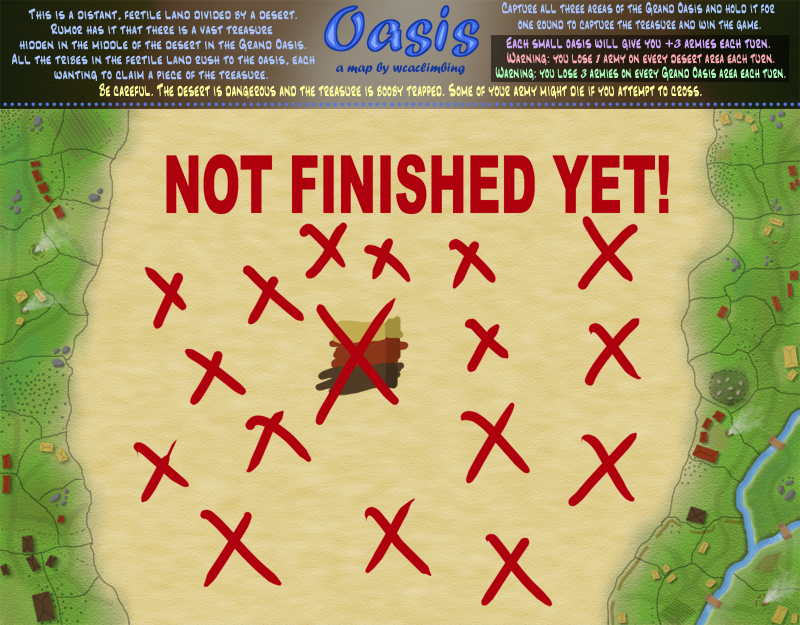
--- 38 Fertile areas (38 starting territories total).
Please comment! With all of the details, everything is split up into many layers, so any changes are easy to make. If you see a problem, tell me!
ps: in case you are wondering what the tan/brown colors in the middle are for, those are the colors I use to paint the houses. I keep them there so I can add more houses if i need them. They are on a separate layer, so they won't effect the final image.
Version 1.9 (cause its still not finished enough to be called 2.0 yet).
Done:
Both Fertile Areas.
Updated font on the map key.
A few other small fixes.
--- 38 Fertile areas (38 starting territories total).
Please comment! With all of the details, everything is split up into many layers, so any changes are easy to make. If you see a problem, tell me!
ps: in case you are wondering what the tan/brown colors in the middle are for, those are the colors I use to paint the houses. I keep them there so I can add more houses if i need them. They are on a separate layer, so they won't effect the final image.
-
wcaclimbing
- Posts: 5598
- Joined: Fri May 12, 2006 10:09 pm
- Location: In your quantum box....Maybe.
- Contact:
-
gimil

- Posts: 8599
- Joined: Sat Mar 03, 2007 12:42 pm
- Gender: Male
- Location: United Kingdom (Scotland)
no need, i was jsut curious, i would prefer to see it go to neutral, since hte desert would eventually kill everyone in realitywcaclimbing wrote:down to 1 left, just like on AoR Magic. should I clarify that in the map key?gimil wrote:For hte -1 on the desert, will you be losing armies until you have 1 left? Or until you fo down to neutral 1?

What do you know about map making, bitch?
Top Score:2403natty_dread wrote:I was wrong
-
wcaclimbing
- Posts: 5598
- Joined: Fri May 12, 2006 10:09 pm
- Location: In your quantum box....Maybe.
- Contact:
is that possible with the code? I thought it could only do it down to 1. Cause turning to neutral would be pretty cool.gimil wrote:no need, i was jsut curious, i would prefer to see it go to neutral, since hte desert would eventually kill everyone in realitywcaclimbing wrote:down to 1 left, just like on AoR Magic. should I clarify that in the map key?gimil wrote:For hte -1 on the desert, will you be losing armies until you have 1 left? Or until you fo down to neutral 1?
EDIT: on second thought, I think turning to neutral might break up the flow of the game too much for me to like. You would be spending all of your time repairing your lines, you wouldn't have any armies left to do everything else. All of your armies that would normally be used for attacking would instead be used to fix your fort chains and heal your empire. Sounds like leaving them at 1s would be the best way to go. what do you think?

I don't know, I kinda like the idea of them going neutral. I think it would add to the gameplay. The problems you cite don't seem like a big deal to me.wcaclimbing wrote:is that possible with the code? I thought it could only do it down to 1. Cause turning to neutral would be pretty cool.gimil wrote:no need, i was jsut curious, i would prefer to see it go to neutral, since hte desert would eventually kill everyone in realitywcaclimbing wrote:down to 1 left, just like on AoR Magic. should I clarify that in the map key?gimil wrote:For hte -1 on the desert, will you be losing armies until you have 1 left? Or until you fo down to neutral 1?
EDIT: on second thought, I think turning to neutral might break up the flow of the game too much for me to like. You would be spending all of your time repairing your lines, you wouldn't have any armies left to do everything else. All of your armies that would normally be used for attacking would instead be used to fix your fort chains and heal your empire. Sounds like leaving them at 1s would be the best way to go. what do you think?
But then, I thought neutral-decay was not yet possible? Isn't that just a suggestion for XML changes right now?

well I don't think the neutral decay is part of the XML yet. Even if it is, you'd be making the desert neutral every turn which would probably be a bit excess and would just encourage killing each other in the fertile lands.
It's not possibly to have the armies drop by 1 or 2 or whatever per turn and then eventually go neutral. It's either a decay where when you have 1 nothing happens or it's a total decay where it goes neutral every turn.
Anyway, I'd like to see a different font for all that legend information. Since it's quite important to explaining the gameplay AND this is the large version of the map, it should be quite readable. At the moment it's not an easy read at all.
It's not possibly to have the armies drop by 1 or 2 or whatever per turn and then eventually go neutral. It's either a decay where when you have 1 nothing happens or it's a total decay where it goes neutral every turn.
Anyway, I'd like to see a different font for all that legend information. Since it's quite important to explaining the gameplay AND this is the large version of the map, it should be quite readable. At the moment it's not an easy read at all.

you can either kill all of them no matter how much are on them (killing neutrals) or get them down by a certain amount until it has dropped to 1 left. there is nothing in between yet. so no, for now it's not possiblewcaclimbing wrote:is that possible with the code? I thought it could only do it down to 1. Cause turning to neutral would be pretty cool.gimil wrote:no need, i was jsut curious, i would prefer to see it go to neutral, since hte desert would eventually kill everyone in realitywcaclimbing wrote:down to 1 left, just like on AoR Magic. should I clarify that in the map key?gimil wrote:For hte -1 on the desert, will you be losing armies until you have 1 left? Or until you fo down to neutral 1?
EDIT: on second thought, I think turning to neutral might break up the flow of the game too much for me to like. You would be spending all of your time repairing your lines, you wouldn't have any armies left to do everything else. All of your armies that would normally be used for attacking would instead be used to fix your fort chains and heal your empire. Sounds like leaving them at 1s would be the best way to go. what do you think?
would be fun if some 'random' places around the map would kill off your troops though however then the map should load a different XML at least every time you start a game, so the spots would be random, would be fun IMO.
- Click image to enlarge.

This si the only problem i see with the map so far. I would prefer to not have the decay because i think it would be annoying to keep having to repair your fortifcation lines and stuff, i think it would be more fun for it just to go down to 1.militant wrote:I really like it, the graphics are amazing, just one little thing about the legend is there is no "s" on army, where it says "Be careful, the dessert is dangerous..."
Guys I am intentionally lurking. Discuss; Play mafia, it is good.
Oderint Dum Metuant says: Don't confuse the easily confused!
Oderint Dum Metuant says: Don't confuse the easily confused!

-
wcaclimbing
- Posts: 5598
- Joined: Fri May 12, 2006 10:09 pm
- Location: In your quantum box....Maybe.
- Contact:
-
wcaclimbing
- Posts: 5598
- Joined: Fri May 12, 2006 10:09 pm
- Location: In your quantum box....Maybe.
- Contact:
For the grass, it is:gimil wrote:wc is it a noise overlay or a texture overlay youve done?
Solid grey layer (127 127 127 RGB)
Set it on Overlay
Put color on a layer below that.
Use Filter-Texturizer on the grey layer using these settings:
Sandstone
200% scale
Relief=7
Light: Bottom
Inverted (check the box)
Then I zoom out to 50%. (my map is double the size of the final image. zooming it out makes it the right size)
Then make a layer on top of the grey and color in a bunch of different (but still similar) colors. Make it very low opacity, so it just shows a bit. you can see this a bit in the browns, blue-greens, and tans that are coloring the grass in some places.
For the sand, I did:
Start with a VERY small image (about 50x50)
Noise filter at 400%. (Black/White)
stretch that until it is rediculously huge (probably 15x the size).
Stretch it even more horizontally. (a lot more. so the sand looks like its piled up in dunes.)
Set it on Overlay.
Color goes in a layer below it.
Use Enhance: Adjust Lighting-Brightness/Contrast on the noise layer until you get a mix that you like.
It would be easier to explain with pictures, but thats basically it.
-
brendan man

- Posts: 354
- Joined: Sun Dec 30, 2007 12:17 pm
- Gender: Male
-
wcaclimbing
- Posts: 5598
- Joined: Fri May 12, 2006 10:09 pm
- Location: In your quantum box....Maybe.
- Contact: