the purpose of Map Making Q&A is to have a place where new and old map makers share their knowledge and help eachother achieve a higher level of understanding photoshop fireworks or any other image editing software we use. my hope is to gather as many tutorials as possible and constantly update them in the first post, thus allowing everybody to quickly find what they need. also you can share your brushes patters and textures. just upload them on the web and post the link.
anybody is free to ask and answer if they follow some simple rules:
rules for asking:
1. please state the name and version of your image editing software. this way you'll make sure you receive a proper advice.
2. please don't bump your question. somebody will answer it.
rules for answering:
1. always quote the question so people will know what the tutorial is about.
2. the tutorial must be in one of these forms: video or text with explanatory images
3. make sure your tutorial is easy to follow even by the noobest of noobs. that means no skipping of steps you assume the readers should know.
general rules:
1. no side talk. posts like "wow" or "great" don't belong here. they just clutter the thread. if you really feel you want to congratulate someone for a nice tutorial then pm him.
2. if you post a collection of brushes textures or patterns please say what software they are for.
Video tutorials:
1. terraforming tutorial by mibi
2. epoch terraforming parts 1-5 by mibi
Image and text tutorials:
1. how to make an old paper by DiM
2. Using the Magic Wand Tool by DiM
3. how to make a mountain by WidowMakers
4. how to make realistic trees by DiM
5. Photoshop keyboard shortcuts by DiM
Layered images:
1. layered mountain file by WidowMakers
2. 8 Thoughts by WidowMakers
http://www.fileden.com/files/2007/6/15/ ... hts_WM.zip
3. Circus Maximus [Revamp] by WidowMakers
http://www.fileden.com/files/2007/6/15/ ... mus_WM.zip
4. Great Lakes by WidowMakers
http://www.fileden.com/files/2007/6/15/ ... kes_WM.zip
5. Indochina [Revamp] by WidowMakers
http://www.fileden.com/files/2007/6/15/ ... ina_WM.zip
6. King of the Mountains by WidowMakers
http://www.fileden.com/files/2007/6/15/ ... OTM_WM.zip
7. Montreal [Revamp] by WidowMakers
http://www.fileden.com/files/2007/6/15/ ... eal_WM.zip
8. realistic trees by DiM
External links:
1. Rotating and cropping in GIMP by DiM
2. Simple Animations in GIMP by DiM
3. Advanced Animations in GIMP by DiM
Brushes, Patterns and Textures:
1. patterns for Fireworks 8 by DiM
2. textures for Fireworks 8 by DiM
Various files:
1. GIMP help files by DiM
Map-Making Q&A
Moderator: Cartographers
Forum rules
Please read the Community Guidelines before posting.
Please read the Community Guidelines before posting.
-
DiM

- Posts: 10415
- Joined: Wed Feb 14, 2007 6:20 pm
- Gender: Male
- Location: making maps for scooby snacks
Map-Making Tutorials
Last edited by DiM on Sun Jun 08, 2008 5:34 am, edited 15 times in total.
“In the beginning God said, the four-dimensional divergence of an antisymmetric, second rank tensor equals zero, and there was light, and it was good. And on the seventh day he rested.”- Michio Kaku

-
gimil

- Posts: 8599
- Joined: Sat Mar 03, 2007 12:42 pm
- Gender: Male
- Location: United Kingdom (Scotland)
mibi wrote:nice thread.
LOLgeneral rules:
1. no side talk. posts like "wow" or "great" don't belong here. they just clutter the thread. if you really feel you want to congratulate someone for a nice tutorial then pm him.
2. if you post a collection of brushes textures or patterns please say what software they are for.
What do you know about map making, bitch?
Top Score:2403natty_dread wrote:I was wrong
-
DiM
- Posts: 10415
- Joined: Wed Feb 14, 2007 6:20 pm
- Gender: Male
- Location: making maps for scooby snacks
come on guys. let's keep this on topic.
will a mod please remove the above 2 posts?
on topic:
software used: fireworks 8, photoshop cs2
question: i want to know how mibi did the shattered brick walls in d-day map.
will a mod please remove the above 2 posts?
on topic:
software used: fireworks 8, photoshop cs2
question: i want to know how mibi did the shattered brick walls in d-day map.
Last edited by DiM on Tue Jun 26, 2007 6:42 am, edited 1 time in total.
“In the beginning God said, the four-dimensional divergence of an antisymmetric, second rank tensor equals zero, and there was light, and it was good. And on the seventh day he rested.”- Michio Kaku
-
Risktaker17

- Posts: 1495
- Joined: Sun Apr 01, 2007 8:09 am
I have a map-making question. Is it possible to make a map without downloading anything to your computer, I'm not allowed to download anything to the computer. I have never made a map before, but I was thinking about making one.
Highest place: 40 1/17/08
Highest point total: 2773 1/17/08
Top Poster Position: 97th
Highest point total: 2773 1/17/08
Top Poster Position: 97th
-
edocsil
- Posts: 102
- Joined: Sat Apr 28, 2007 8:09 am
- Gender: Male
- Location: The Great State Of Minnesota
i am having a problem with my antarctica map im using inkscape but i might be able to use gimp (learning how to). the problem is impasible borders rivers aren't a problem in inkscape its mountains that r tough because u have to import a pic into inkscape and then edit it , so it has a box around ur image i can color that box but it takes a while.
how can i put in impassible borders preferable mountains?
how can i put in impassible borders preferable mountains?
Edoc'sil
Commander9 wrote:Trust Edoc, as I know he's VERY good.
zimmah wrote:Mind like a brick.
-
DiM
- Posts: 10415
- Joined: Wed Feb 14, 2007 6:20 pm
- Gender: Male
- Location: making maps for scooby snacks
i'm not sure i fully understand your problem but my guess is you have a picture of a mountain and you want to use just the mountain and not the background. here's a tutorial on the magic wand tool. the tutorial is for gimp. i'm not sure if you have the magic wand in inkscape.edocsil wrote:i am having a problem with my antarctica map im using inkscape but i might be able to use gimp (learning how to). the problem is impasible borders rivers aren't a problem in inkscape its mountains that r tough because u have to import a pic into inkscape and then edit it , so it has a box around ur image i can color that box but it takes a while.
how can i put in impassible borders preferable mountains?
Using the Magic Wand
you have this image:
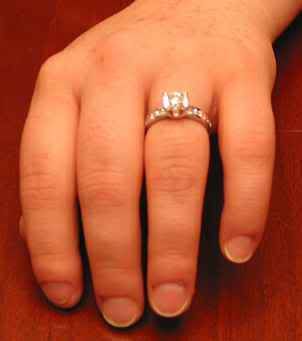
you want to use the ring but not the hand.
zoom into the ring as much as you need but make it so you can see the entire ring and a little bit around it. now select the magic wand tool that looks like this:

set the tolerance at a low value. let's say 2 or 4. using the magic wand, click on the ring. a small part will highlight.
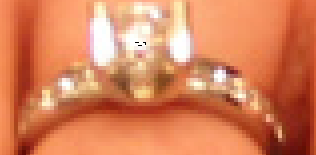
you can select larger areas by clicking and holding down the mouse button and moving your mouse down. this selects a larger area, but sometimes it will select unnecessary parts of the picture. you can press undo(or Ctrl+Z) to undo anything you accidentally selected. you can also hold Ctrl and press unwanted areas to deselect them. once you have a little bit selected, hold the Shift key and do the same thing. Your area will generally increase, but make sure you don't select unwanted areas. keep the Shift key held down and click, click the mouse down and unclick. then select another part on the ring. keep repeating the process until the entire ring is selected. like this:
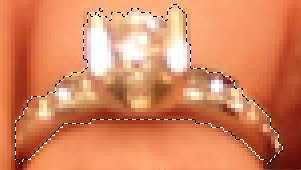
when you're done, copy the selections you just made by pressing Ctrl+C or going to Edit and Copy Image. now you're going to want to make a new layer. make sure it's on transparent mode. now click the layer you have just made. then go to your image and press Ctrl+V or Edit > Paste. this will paste the ring on the new layer.
your newly created layer will contain nothing but the ring.
do so to any image you need.
“In the beginning God said, the four-dimensional divergence of an antisymmetric, second rank tensor equals zero, and there was light, and it was good. And on the seventh day he rested.”- Michio Kaku
-
edocsil
- Posts: 102
- Joined: Sat Apr 28, 2007 8:09 am
- Gender: Male
- Location: The Great State Of Minnesota
.... ok got all that done but now i cant figure out how to change the size of my mountain in gimp
idealy if u could tell me how to download the help files for gimp i wouldnt need to bother u
found the help files online
idealy if u could tell me how to download the help files for gimp i wouldnt need to bother u
found the help files online
Last edited by edocsil on Tue Jun 26, 2007 10:40 am, edited 1 time in total.
Edoc'sil
Commander9 wrote:Trust Edoc, as I know he's VERY good.
zimmah wrote:Mind like a brick.
-
DiM
- Posts: 10415
- Joined: Wed Feb 14, 2007 6:20 pm
- Gender: Male
- Location: making maps for scooby snacks
to scale something in gimp right click that something and go to image then scale image. after that set the dimensions you want and click ok.edocsil wrote:.... ok got all that done but now i cant figure out how to change the size of my mountain in gimp
idealy if u could tell me how to download the help files for gimp i wouldnt need to bother u
help files are here:
ftp://ftp.gimp.org/pub/gimp/help/
“In the beginning God said, the four-dimensional divergence of an antisymmetric, second rank tensor equals zero, and there was light, and it was good. And on the seventh day he rested.”- Michio Kaku

Ok.. So how would one go about making buildings, such as in the troy map.. I can make buildings, but they seldom(never) look quite as good as those.. And its somewhat hard to make out quite what he's doing in the movie.. Also, the movie's little help to me anyway because I use GIMP.. The only way I could make use of it is to find the GIMP eqivalent to the Photoshop tools.. Which can't be done because its hard to make out... But anyway, I'd like any sort of help in forming buildings like those, or any other varieties of buildings.. Maybe even castle-like structures..
And i'd like to know how the trees are done, its difficult to see what he's using, and is there a way to do that in GIMP?
Thats all right now, thanks.
And i'd like to know how the trees are done, its difficult to see what he's using, and is there a way to do that in GIMP?
Thats all right now, thanks.
-
gimil
- Posts: 8599
- Joined: Sat Mar 03, 2007 12:42 pm
- Gender: Male
- Location: United Kingdom (Scotland)
for the trees i would sue a small rounded brush ( i used a 5pz and a 3px) place a few dots around of green around then drop shadow it. Thats how its done in photoshop but i dont know if you can do a drop shadow to a layer in GIMP.
What do you know about map making, bitch?
Top Score:2403natty_dread wrote:I was wrong

-
DiM
- Posts: 10415
- Joined: Wed Feb 14, 2007 6:20 pm
- Gender: Male
- Location: making maps for scooby snacks
read here:Telvannia wrote:im using gimp 2.2.11
i need to know if anyone has a way to rotate something with out it blurring, for my map i want to rotate buildings to fit the area i want them in, at it is easier to make them as a rectangle then rotate than make it on a angle.
http://world.std.com/~mmcirvin/gimp_tut ... _crop.html
“In the beginning God said, the four-dimensional divergence of an antisymmetric, second rank tensor equals zero, and there was light, and it was good. And on the seventh day he rested.”- Michio Kaku
-
DiM
- Posts: 10415
- Joined: Wed Feb 14, 2007 6:20 pm
- Gender: Male
- Location: making maps for scooby snacks
here you go 2 tutorials to animations in GIMP:Telvannia wrote:Does anyone know a good quick way to make animations using gimp?
http://www.gimp.org/tutorials/Simple_Animations/
http://www.gimp.org/tutorials/Advanced_Animations/
“In the beginning God said, the four-dimensional divergence of an antisymmetric, second rank tensor equals zero, and there was light, and it was good. And on the seventh day he rested.”- Michio Kaku

-
DiM
- Posts: 10415
- Joined: Wed Feb 14, 2007 6:20 pm
- Gender: Male
- Location: making maps for scooby snacks
photoshop question
sorry to make this topic but i had no idea who to ask and were to post. it can be deleted after i get my answer.
so here's the question. how can i merge some brushes or layer styles or shapes?
i have let's say basic brushes file and assorted brushes file. and i want all of them in one single file because i'm tired of switching between them all the time.
thanks.
so here's the question. how can i merge some brushes or layer styles or shapes?
i have let's say basic brushes file and assorted brushes file. and i want all of them in one single file because i'm tired of switching between them all the time.
thanks.
“In the beginning God said, the four-dimensional divergence of an antisymmetric, second rank tensor equals zero, and there was light, and it was good. And on the seventh day he rested.”- Michio Kaku



-
gimil
- Posts: 8599
- Joined: Sat Mar 03, 2007 12:42 pm
- Gender: Male
- Location: United Kingdom (Scotland)
*sniffs*fireedud wrote:Omg, is that your first positive comment?Spockers wrote:I wouldn't be concerned about topics like this, Dim.
I think it's the best place for them, and there probably should be a lot more.
Such a proud day.
What do you know about map making, bitch?
Top Score:2403natty_dread wrote:I was wrong