
do you have a way to fix these lines isaiah40?isaiah40 wrote:Okay, everyone needs to take a break from this. There is no need to continue bickering back and forth.
Re: RAIL ASIA [1.11.12] QUENCHED
Moderator: Cartographers
Forum rules
Please read the Community Guidelines before posting.
Please read the Community Guidelines before posting.
Re: RAIL ASIA [1.3.12] V30-P25 Final adjustments
* Pearl Harbour * Waterloo * Forbidden City * Jamaica * Pot Mosbi

Re: RAIL ASIA [1.3.12] V30-P25 Final adjustments
I hate to see this map in the recycling box  !
!
!AoG for President of the World!!
I promise he will put George W. Bush to shame!
I promise he will put George W. Bush to shame!

Re: RAIL ASIA [1.3.12] V30-P25 Final adjustments
I seriously hate everyone for letting this be binned.
High Score: 2906
-
Nola_Lifer

- Posts: 819
- Joined: Mon Oct 13, 2008 4:46 pm
- Location: 雪山
- Contact:
Re: RAIL ASIA [23.2.12] V29-P24 Final adjustments
cairnswk wrote:
- Click image to enlarge.
- Click image to enlarge.
http://i155.photobucket.com/albums/s282 ... l-test.png
http://i155.photobucket.com/albums/s282 ... l-test.png
http://www.peeje.com/files/359944427/Ra ... inal_6.xml
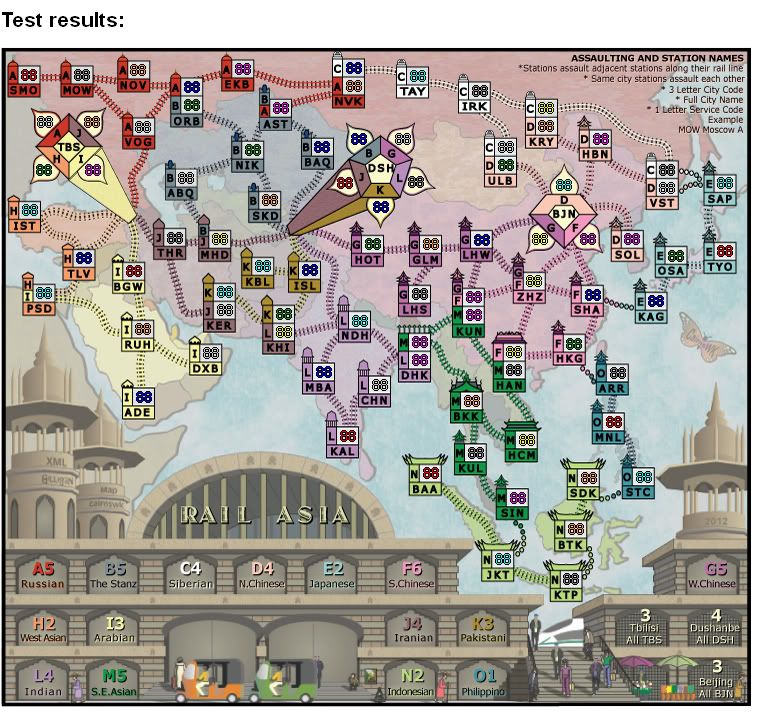
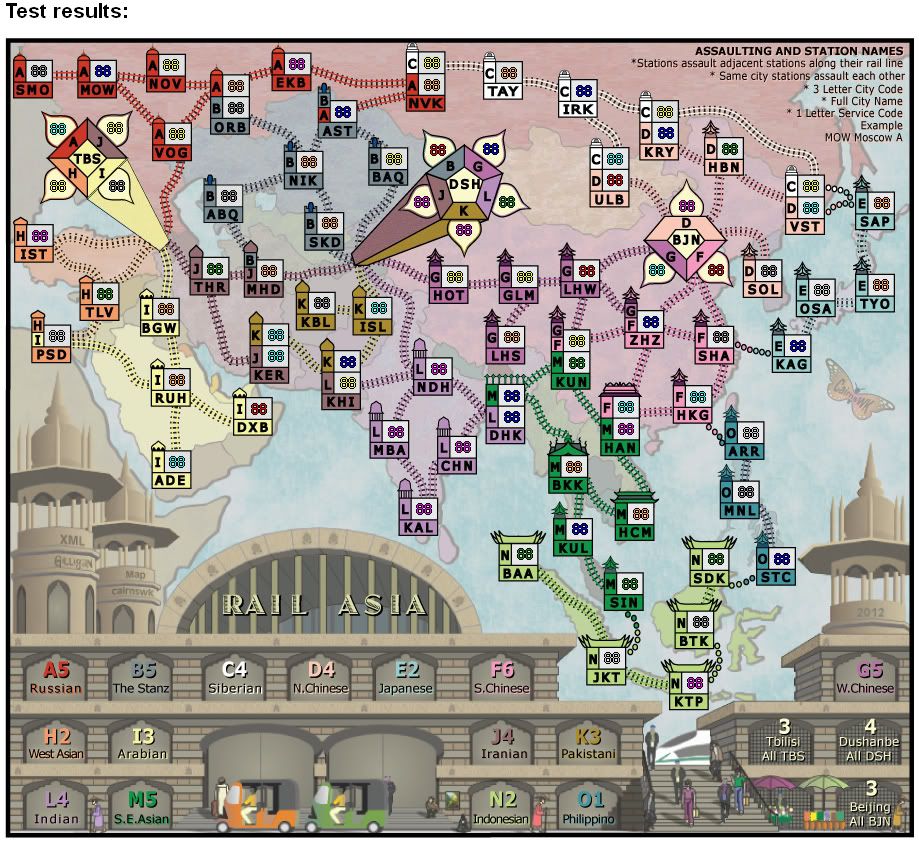
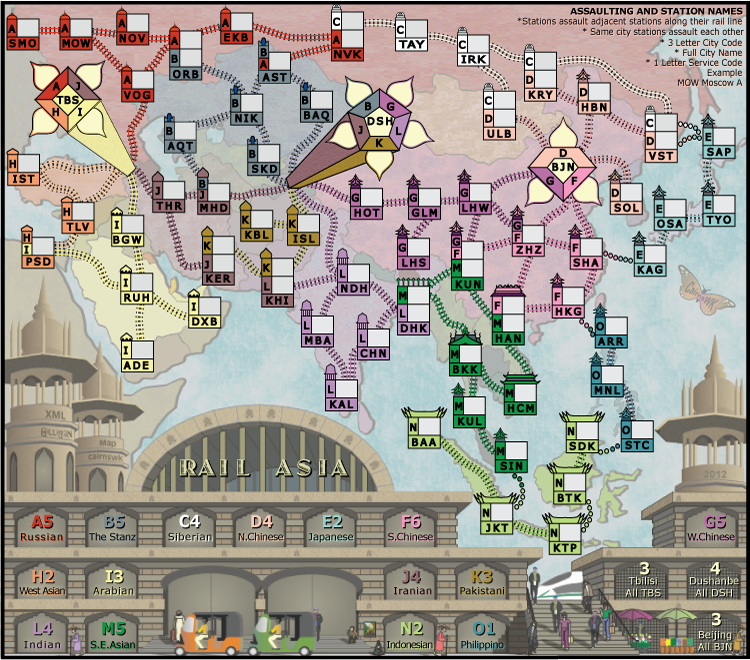
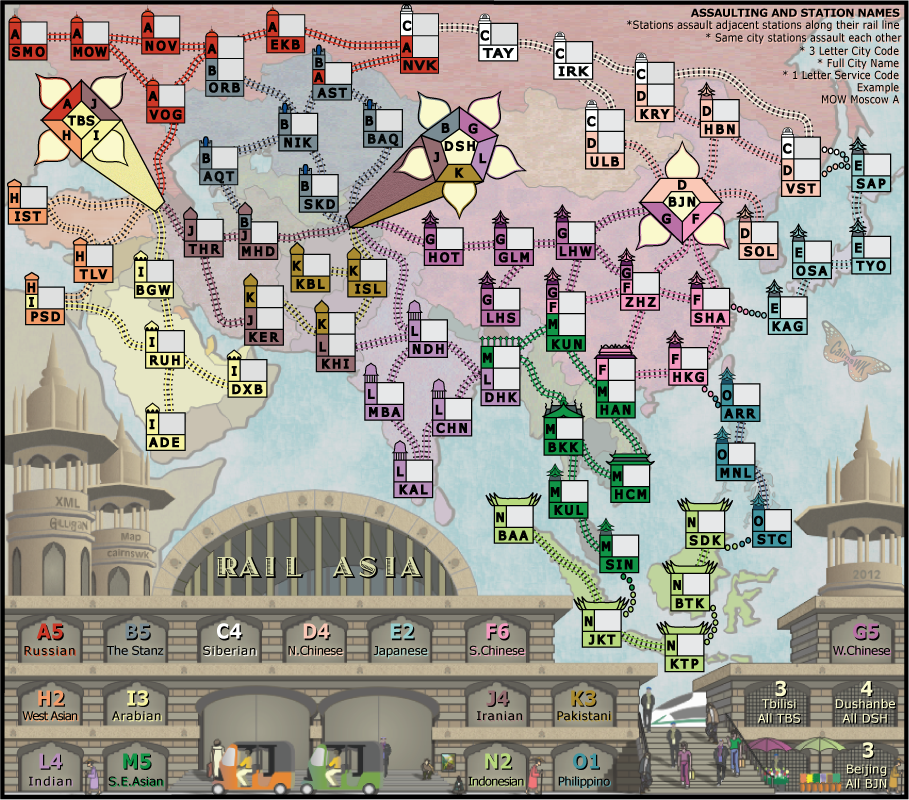
 I am ready to play this!
Re: RAIL ASIA [11.3.12] V31-P27 Final adjustments
Image deleted and moved to next page.
Last edited by cairnswk on Sun Mar 11, 2012 4:58 pm, edited 1 time in total.
* Pearl Harbour * Waterloo * Forbidden City * Jamaica * Pot Mosbi
-
natty dread

- Posts: 12876
- Joined: Fri Feb 08, 2008 8:58 pm
- Location: just plain fucked
Re: RAIL ASIA [11.3.12] V31-P27 Final adjustments
This is puuuurrrrrrfect cairns!! Well done!!
Re: RAIL ASIA [11.3.12] V31-P27 Final adjustments
guys, you can well jump up and down at this if you want but i still far from impressed at PS
I still have to go through now and re-size every single station again on the grid because when up-scaling the image, PS doesn't keep the outer edge of the stroke lines on the grid.
it's a shame that i had to go through this process for the lines, not mention the other shit that went with it. Version 29 was still overall better than this version even though it now has perrrrffffeeeccctttly straight boxes.
This has taken 4 attempts at re-doing stations from wow to go in three diferent programs just to satisfy this condition, and i consider that unreasonable for a site that doesn't pay professionally, nor for other commentors who can't also live-up to their own professional ideals.
And i am still not happy that i have had to re-draw this in PS and lost the quality of the background image because it had to be "placed" in PS.
So...there is still a way to go yet.
I still have to go through now and re-size every single station again on the grid because when up-scaling the image, PS doesn't keep the outer edge of the stroke lines on the grid.
it's a shame that i had to go through this process for the lines, not mention the other shit that went with it. Version 29 was still overall better than this version even though it now has perrrrffffeeeccctttly straight boxes.
This has taken 4 attempts at re-doing stations from wow to go in three diferent programs just to satisfy this condition, and i consider that unreasonable for a site that doesn't pay professionally, nor for other commentors who can't also live-up to their own professional ideals.
And i am still not happy that i have had to re-draw this in PS and lost the quality of the background image because it had to be "placed" in PS.
So...there is still a way to go yet.
* Pearl Harbour * Waterloo * Forbidden City * Jamaica * Pot Mosbi
-
koontz1973
- Posts: 6960
- Joined: Thu Jan 01, 2009 10:57 am
Re: Re: RAIL ASIA [11.3.12] V31-P27 Final adjustments
Good work cairnswk. Stations look perfect.
Posted this but removed and now reposting it.
Posted this but removed and now reposting it.

-
DiM

- Posts: 10415
- Joined: Wed Feb 14, 2007 6:20 pm
- Gender: Male
- Location: making maps for scooby snacks
Re: Re: RAIL ASIA [11.3.12] V31-P27 Final adjustments
let me just say that the new stations are wonderful.
“In the beginning God said, the four-dimensional divergence of an antisymmetric, second rank tensor equals zero, and there was light, and it was good. And on the seventh day he rested.”- Michio Kaku
-
natty dread
- Posts: 12876
- Joined: Fri Feb 08, 2008 8:58 pm
- Location: just plain fucked
Re: RAIL ASIA [11.3.12] V31-P27 Final adjustments
How is that?cairnswk wrote:And i am still not happy that i have had to re-draw this in PS and lost the quality of the background image because it had to be "placed" in PS.
Can't you export the background image (ie. the map without the stations) as a bitmap in the original software, then import that bitmap in PS and add the stations on top of it there? The background should stay unchanged that way.
That said, I don't really see anything wrong with the background though... what exactly is the problem with it?

Re: RAIL ASIA [12.3.12] V31-P27 Final adjustments
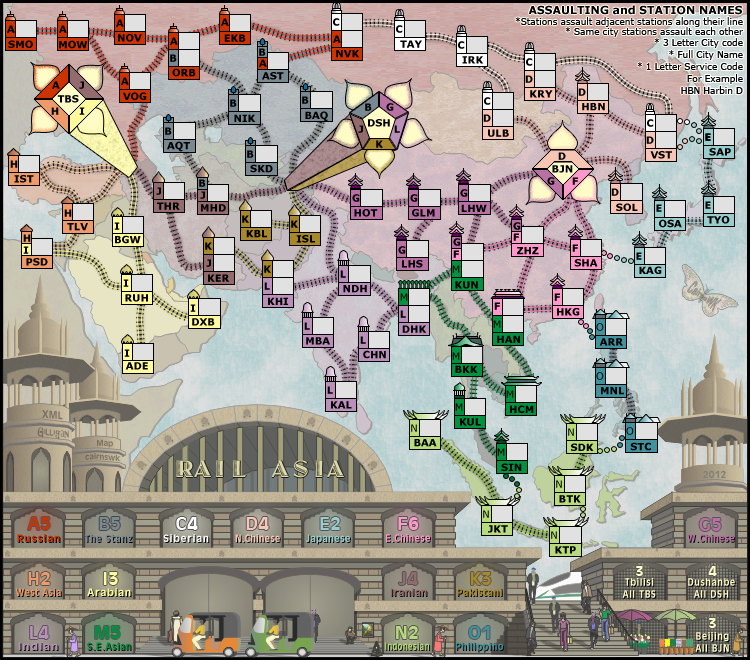
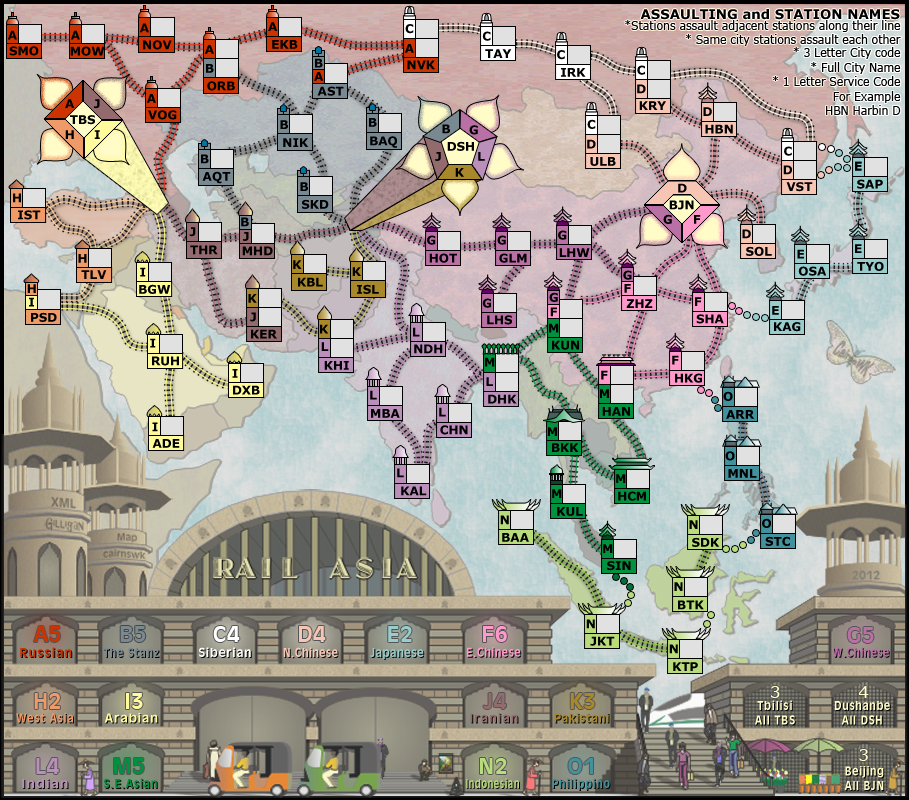
Last edited by cairnswk on Mon Mar 12, 2012 3:28 pm, edited 1 time in total.
* Pearl Harbour * Waterloo * Forbidden City * Jamaica * Pot Mosbi
-
DiM
- Posts: 10415
- Joined: Wed Feb 14, 2007 6:20 pm
- Gender: Male
- Location: making maps for scooby snacks
Re: Re: RAIL ASIA [12.3.12] V31-P28 Final adjustments
1. the top of the tbs station is faulty. a and j aren't aligned to form a proper tip. not sure how to explain this better...

2. the dsh station pentagon is slightly tilted to the right, thus forming a weird skewed pentagon. also the way the corners form is a bit off. like the little isosceles trapezes aren't aligned

3. alignment issues on the bjn station too.
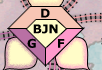
2. the dsh station pentagon is slightly tilted to the right, thus forming a weird skewed pentagon. also the way the corners form is a bit off. like the little isosceles trapezes aren't aligned
3. alignment issues on the bjn station too.
“In the beginning God said, the four-dimensional divergence of an antisymmetric, second rank tensor equals zero, and there was light, and it was good. And on the seventh day he rested.”- Michio Kaku

Re: Re: RAIL ASIA [12.3.12] V31-P28 Final adjustments
I have a bad feeling that the misalignments in the various polygons that DiM has pointed out may be due to restricting the vertices to an alignment grid, which got us the very crisp lines we are seeing now. I do hope we are not faced with a choice of one or the other.
Re: Re: RAIL ASIA [12.3.12] V31-P28 Final adjustments
There is a compromise...above.ender516 wrote:I have a bad feeling that the misalignments in the various polygons that DiM has pointed out may be due to restricting the vertices to an alignment grid, which got us the very crisp lines we are seeing now. I do hope we are not faced with a choice of one or the other.

* Pearl Harbour * Waterloo * Forbidden City * Jamaica * Pot Mosbi
-
natty dread
- Posts: 12876
- Joined: Fri Feb 08, 2008 8:58 pm
- Location: just plain fucked
Re: RAIL ASIA [12.3.12] V31-P28 Final adjustments
Maybe I'm missing something but is there a reason why you can't do what I said in my last post?
natty dread wrote:Can't you export the background image (ie. the map without the stations) as a bitmap in the original software, then import that bitmap in PS and add the stations on top of it there? The background should stay unchanged that way.
Re: RAIL ASIA [12.3.12] V31-P28 Final adjustments
natty i don't have time right now as i have uni on, but will explain fully by Thursday.natty dread wrote:Maybe I'm missing something but is there a reason why you can't do what I said in my last post?
natty dread wrote:Can't you export the background image (ie. the map without the stations) as a bitmap in the original software, then import that bitmap in PS and add the stations on top of it there? The background should stay unchanged that way.
* Pearl Harbour * Waterloo * Forbidden City * Jamaica * Pot Mosbi
Re: RAIL ASIA [12.3.12] V31-P28 Final adjustments
natty. the original was done in Coreldraw.natty dread wrote:Maybe I'm missing something but is there a reason why you can't do what I said in my last post?
natty dread wrote:Can't you export the background image (ie. the map without the stations) as a bitmap in the original software, then import that bitmap in PS and add the stations on top of it there? The background should stay unchanged that way.
CD doesn't save to but exports to PS.
the below image shows the deterioration on the original.
Srcreenshots...
A = the original
B = the exported file
C= the placed image into PS.
It doesn't matter whether you export as vector or default, but bitmaps deteriorate worse so that wasn't an option.
I simply feel that by the time you export from one program into another and then export out again to another .png, there is going to be loss of image intergrity, and it is this i am disappointed in.

* Pearl Harbour * Waterloo * Forbidden City * Jamaica * Pot Mosbi
Re: Re: RAIL ASIA [12.3.12] V31-P28 Final adjustments
Could ImageMagick be of any assistance here? I understand that it is quite the image file converter.
-
natty dread
- Posts: 12876
- Joined: Fri Feb 08, 2008 8:58 pm
- Location: just plain fucked
Re: RAIL ASIA [12.3.12] V31-P28 Final adjustments
What I mean is, export the image from Coreldraw into a PNG, without the stations... the same way you originally saved the image directly from coreldraw. Then import that PNG as a regular layer in photoshop. Then just add the stations in photoshop like you did before. That way, the background should look the same way as originally, when you only used coreldraw.
Re: RAIL ASIA [12.3.12] V31-P28 Final adjustments
I am already doing your suggestion...are you not seeing the deterioration in the image when it is exported from CD to a png?natty dread wrote:What I mean is, export the image from Coreldraw into a PNG, without the stations... the same way you originally saved the image directly from coreldraw. Then import that PNG as a regular layer in photoshop. Then just add the stations in photoshop like you did before. That way, the background should look the same way as originally, when you only used coreldraw.
* Pearl Harbour * Waterloo * Forbidden City * Jamaica * Pot Mosbi
Re: Re: RAIL ASIA [12.3.12] V31-P28 Final adjustments
Thanks ender516. i'll have a look at this.ender516 wrote:Could ImageMagick be of any assistance here? I understand that it is quite the image file converter.
* Pearl Harbour * Waterloo * Forbidden City * Jamaica * Pot Mosbi
-
natty dread
- Posts: 12876
- Joined: Fri Feb 08, 2008 8:58 pm
- Location: just plain fucked
Re: RAIL ASIA [12.3.12] V31-P28 Final adjustments
Ok, I really don't see how that is possible.cairnswk wrote:I am already doing your suggestion...are you not seeing the deterioration in the image when it is exported from CD to a png?natty dread wrote:What I mean is, export the image from Coreldraw into a PNG, without the stations... the same way you originally saved the image directly from coreldraw. Then import that PNG as a regular layer in photoshop. Then just add the stations in photoshop like you did before. That way, the background should look the same way as originally, when you only used coreldraw.
How did you originally save your map, when you only used Coreldraw? Why didn't it deteriorate then?
Re: RAIL ASIA [12.3.12] V31-P28 Final adjustments
CD saves as .cdr. CD can export as a png/jpg/gif/psd/ai...i exported as a .png which you have often told me in the past is the best. It did deteriorate then...but that is part of what i am saying. It deterioraites enough when saving from CD to .png. importing that png into program and then exporting it again only deteriorates it further.natty dread wrote:Ok, I really don't see how that is possible.cairnswk wrote:I am already doing your suggestion...are you not seeing the deterioration in the image when it is exported from CD to a png?natty dread wrote:What I mean is, export the image from Coreldraw into a PNG, without the stations... the same way you originally saved the image directly from coreldraw. Then import that PNG as a regular layer in photoshop. Then just add the stations in photoshop like you did before. That way, the background should look the same way as originally, when you only used coreldraw.
How did you originally save your map, when you only used Coreldraw? Why didn't it deteriorate then?
Now, please enought of this one, i know you're only trying to help, but let's move on.
* Pearl Harbour * Waterloo * Forbidden City * Jamaica * Pot Mosbi
-
natty dread
- Posts: 12876
- Joined: Fri Feb 08, 2008 8:58 pm
- Location: just plain fucked
Re: RAIL ASIA [12.3.12] V31-P28 Final adjustments
Ok, that shouldn't be possible.cairnswk wrote:It deterioraites enough when saving from CD to .png. importing that png into program and then exporting it again only deteriorates it further.
I get it that you lose some quality when you save as PNG from CD, since CD is a vector software. But when you import that PNG to photoshop, it should stay the same. PNG is a lossless format. If I import a PNG image as a layer in GIMP, then save that image again as PNG, it stays exactly the same. The same should apply to photoshop by all logic.
I can see a couple of possible explanations here:
- maybe you are saving the image as an 8-bit indexed png instead of a 24 bit RGB png? PNG supports both 24-bit and 8-bit colour modes, so if you're saving as an 8-bit PNG, you'll obviously lose some detail and colour depth. You could check the settings in both softwares and see if there are options to how the PNG:s are exported.
- another explanation is that you have some sort of filters or adjustment layers active in photoshop which modify the original PNG somehow.
- or maybe you're not working in rgb mode in photoshop? if you're working in some other colourspace, like cmyk or ycbcr, it can modify the image.