RuneScape Map [Abandoned]
Moderator: Cartographers
Forum rules
Please read the Community Guidelines before posting.
Please read the Community Guidelines before posting.
-
PimpCaneYoAss
- Posts: 185
- Joined: Fri Feb 16, 2007 3:04 pm
- Location: Connecticut
-
DiM

- Posts: 10415
- Joined: Wed Feb 14, 2007 6:20 pm
- Gender: Male
- Location: making maps for scooby snacks
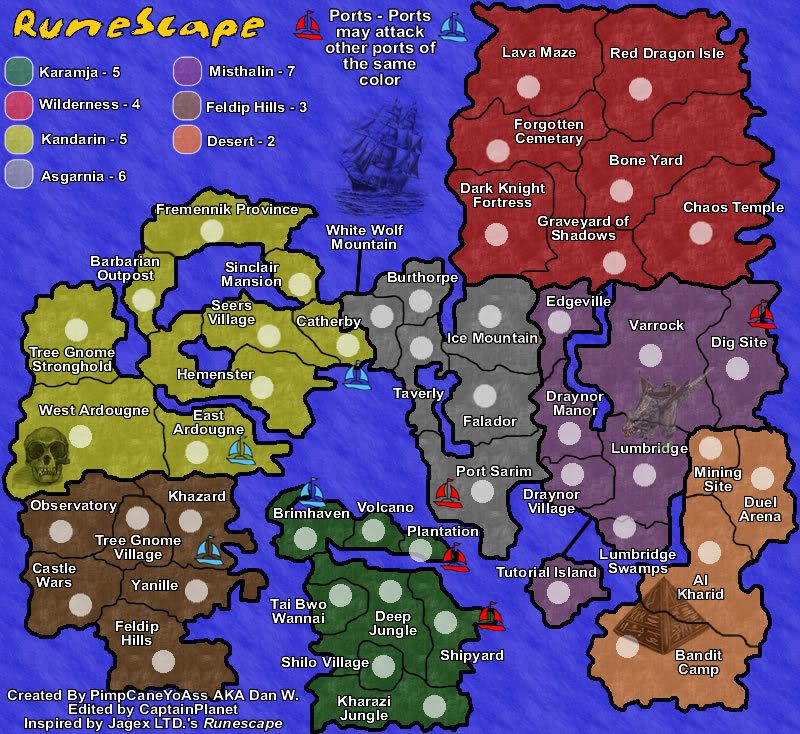
making the pictures transparent does not help. it's all about how you make them blend.
here i added a skull a ship a dragon and a pyramid.
blending in different ways but still blending. your pictures have weird margins.
if you tell me what software you use i might be able to help you and explain how to do it.
here i added a skull a ship a dragon and a pyramid.
blending in different ways but still blending. your pictures have weird margins.
if you tell me what software you use i might be able to help you and explain how to do it.
“In the beginning God said, the four-dimensional divergence of an antisymmetric, second rank tensor equals zero, and there was light, and it was good. And on the seventh day he rested.”- Michio Kaku
-
PimpCaneYoAss
- Posts: 185
- Joined: Fri Feb 16, 2007 3:04 pm
- Location: Connecticut
-
DiM
- Posts: 10415
- Joined: Wed Feb 14, 2007 6:20 pm
- Gender: Male
- Location: making maps for scooby snacks
those aren't black and white images. well not all of them. look at the dragon or the pyramid. they still have colour. the pyramid is brown and the dragon is greenish with brown. the skull and the ship are b&w
“In the beginning God said, the four-dimensional divergence of an antisymmetric, second rank tensor equals zero, and there was light, and it was good. And on the seventh day he rested.”- Michio Kaku
-
DiM
- Posts: 10415
- Joined: Wed Feb 14, 2007 6:20 pm
- Gender: Male
- Location: making maps for scooby snacks
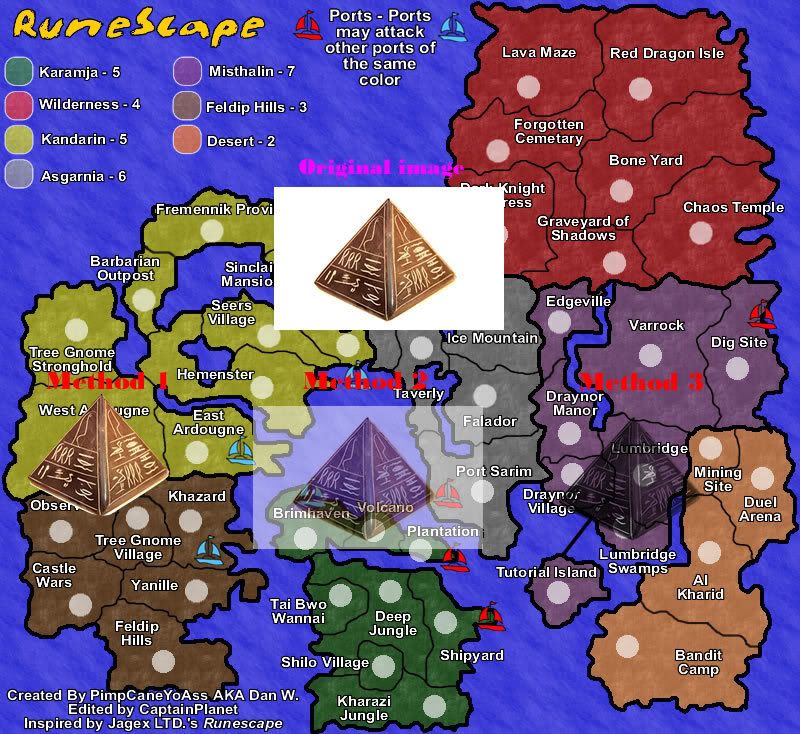
here is a tutorial about different ways to blend the pyramid.
first method:
1. select the magic wand and click the white background (adjust the parameters to your desire)
2. right click inside the selection -> inverse marquee
3. select a white background in the left panel.
4. right click on the selection and select "convert to path" now the pramid is gone
5. shift click both layers to select them. or press ctrl+a
6. go to modify -> mask -> group as mask.
now the 2 layers are joined and the white background is gone, being replaced with a transparent one. copy paste the new image anywhere.
the quality depends on how you set the parameters on the marquee. as you can see i have some white traces at the bottom
second method:
1. get the original image and copy paste it on your map.
2. select it and at the bottom panel next to the transparency setting you have various options. select average. it works best if you already have masked the image. as you can see i still have the full white background.
third method:
1. this one is really simple. just take the original image and at the bottom panel click + to add a filter. then go to other and click on convert to alpha.
the drawback is that it turns the image to b&w.
for best effects combine above methods.
here's the image:
first method:
1. select the magic wand and click the white background (adjust the parameters to your desire)
2. right click inside the selection -> inverse marquee
3. select a white background in the left panel.
4. right click on the selection and select "convert to path" now the pramid is gone
5. shift click both layers to select them. or press ctrl+a
6. go to modify -> mask -> group as mask.
now the 2 layers are joined and the white background is gone, being replaced with a transparent one. copy paste the new image anywhere.
the quality depends on how you set the parameters on the marquee. as you can see i have some white traces at the bottom
second method:
1. get the original image and copy paste it on your map.
2. select it and at the bottom panel next to the transparency setting you have various options. select average. it works best if you already have masked the image. as you can see i still have the full white background.
third method:
1. this one is really simple. just take the original image and at the bottom panel click + to add a filter. then go to other and click on convert to alpha.
the drawback is that it turns the image to b&w.
for best effects combine above methods.
here's the image:
“In the beginning God said, the four-dimensional divergence of an antisymmetric, second rank tensor equals zero, and there was light, and it was good. And on the seventh day he rested.”- Michio Kaku
-
PimpCaneYoAss
- Posts: 185
- Joined: Fri Feb 16, 2007 3:04 pm
- Location: Connecticut
NEW UPDATE 4/18/07
Normal, nontransparent version
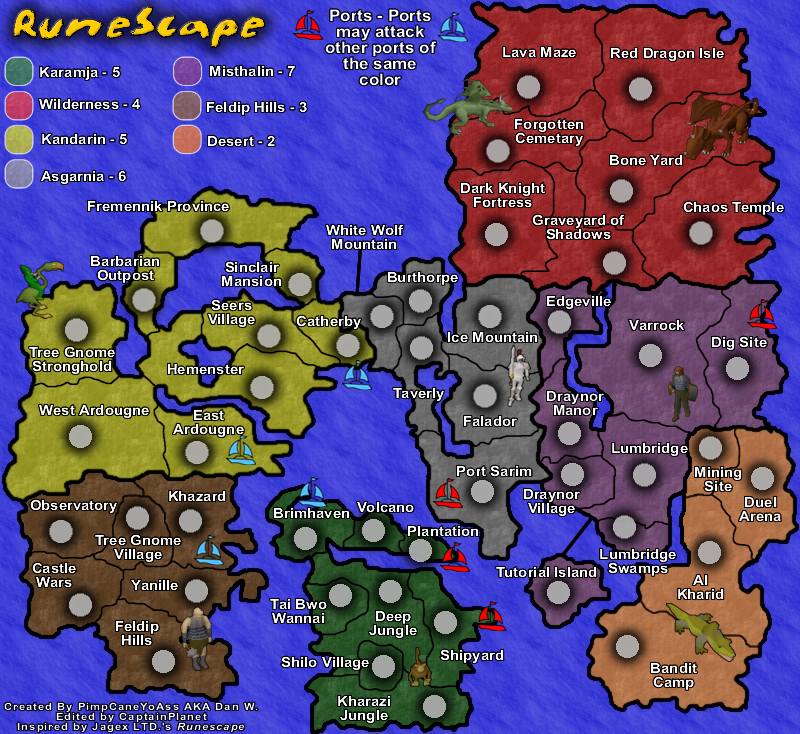
Average, transparent version
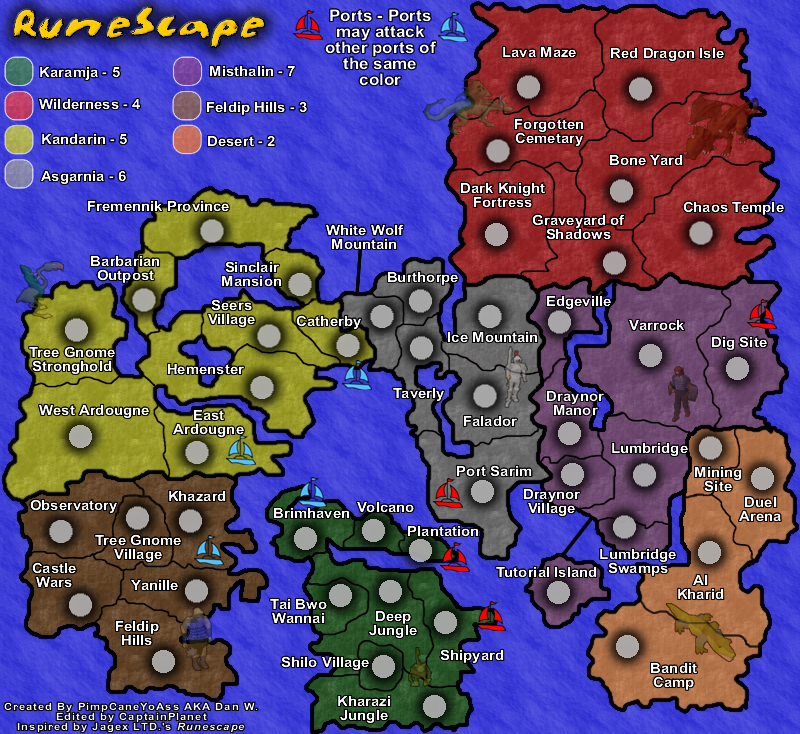
Changes
-New "RuneScape" images
Comments
-Added new images directly from RuneScape
-Seem to blend well
-Open to all suggestions
Normal, nontransparent version
Average, transparent version
Changes
-New "RuneScape" images
Comments
-Added new images directly from RuneScape
-Seem to blend well
-Open to all suggestions
Last edited by PimpCaneYoAss on Wed Apr 18, 2007 6:54 pm, edited 1 time in total.
-
CaptainPlanet
- Posts: 132
- Joined: Wed Feb 14, 2007 6:21 pm
- Location: Bankhead
-
PimpCaneYoAss
- Posts: 185
- Joined: Fri Feb 16, 2007 3:04 pm
- Location: Connecticut
-
PimpCaneYoAss
- Posts: 185
- Joined: Fri Feb 16, 2007 3:04 pm
- Location: Connecticut
-
PimpCaneYoAss
- Posts: 185
- Joined: Fri Feb 16, 2007 3:04 pm
- Location: Connecticut
-
PimpCaneYoAss
- Posts: 185
- Joined: Fri Feb 16, 2007 3:04 pm
- Location: Connecticut
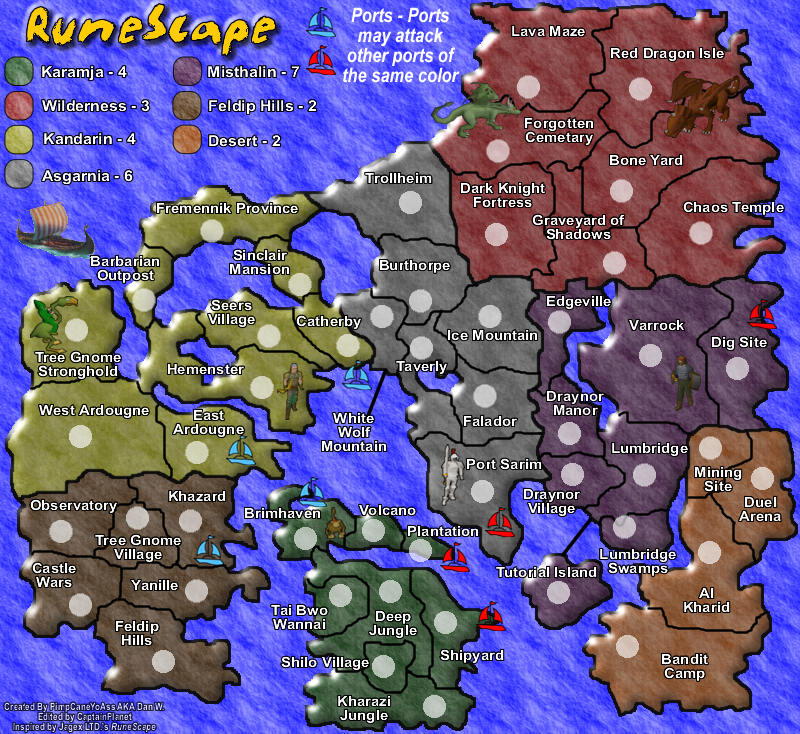
NEW UPDATE 4/19/07
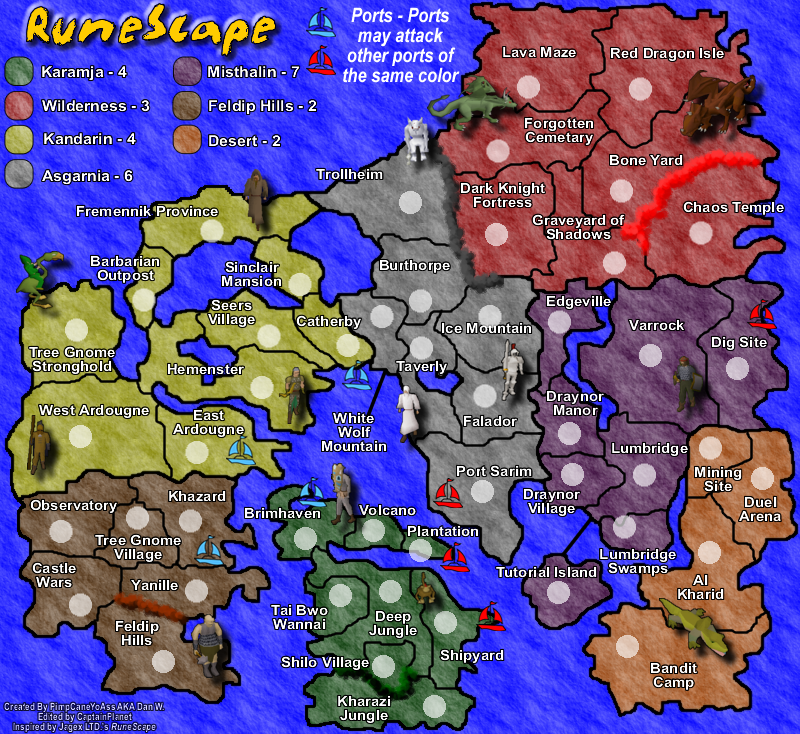
Changes
-Added Trollheim to Asgarnia
-Added different impassable barriers
-Changed the texture of the land
-Added more images
-Added a drop shadow to the images
-Removed the shadow from the army circles
-Moved the title and added bevel
-Slightly moved some images
-Added black line around the legend parts
-Increased the text size in the legend
Comments
-Trollheim gave me a chance to add mountain to that part of the map. I still need to take a look at the new bonuses however.
-The impassable barriers add a bit more flavor to the map.
-The colors of the land stayed the same but added some texture (No texture was present before this)
-More images will help the feel of the map and the shadow adds a nice touch
-I had to remove the shadows from the army circles for crowding reasons.
-The title is now centered on th legend and the bevel helps emphasize it.
-Some images were moved to make sure they weren't floating on the water.
-The color codes of the legend recieved a black line to help promote their purpose.
-The text size in the legend use to be the same size of the country names but now is one size bigger.
Problems to be addressed
-Blur borders??? Let me know what you think about this
-Bonuses need to be recalculated
-Leave feedback with more issues
Changes
-Added Trollheim to Asgarnia
-Added different impassable barriers
-Changed the texture of the land
-Added more images
-Added a drop shadow to the images
-Removed the shadow from the army circles
-Moved the title and added bevel
-Slightly moved some images
-Added black line around the legend parts
-Increased the text size in the legend
Comments
-Trollheim gave me a chance to add mountain to that part of the map. I still need to take a look at the new bonuses however.
-The impassable barriers add a bit more flavor to the map.
-The colors of the land stayed the same but added some texture (No texture was present before this)
-More images will help the feel of the map and the shadow adds a nice touch
-I had to remove the shadows from the army circles for crowding reasons.
-The title is now centered on th legend and the bevel helps emphasize it.
-Some images were moved to make sure they weren't floating on the water.
-The color codes of the legend recieved a black line to help promote their purpose.
-The text size in the legend use to be the same size of the country names but now is one size bigger.
Problems to be addressed
-Blur borders??? Let me know what you think about this
-Bonuses need to be recalculated
-Leave feedback with more issues
-
DiM
- Posts: 10415
- Joined: Wed Feb 14, 2007 6:20 pm
- Gender: Male
- Location: making maps for scooby snacks
i really don't like how you did the images.
first the images are bad. but since they are from runescape maybe the fans will like them
second. because of the shadow they seem to be floating above the map. not good they're supposed to be on the map not above it.
and finally third. i like subtle blending. the images should complement the map not distract the eye. something like i showed you before.
edit// i also don't like the impassable borders they look like coloured smoke or foam.
first the images are bad. but since they are from runescape maybe the fans will like them
second. because of the shadow they seem to be floating above the map. not good they're supposed to be on the map not above it.
and finally third. i like subtle blending. the images should complement the map not distract the eye. something like i showed you before.
edit// i also don't like the impassable borders they look like coloured smoke or foam.
“In the beginning God said, the four-dimensional divergence of an antisymmetric, second rank tensor equals zero, and there was light, and it was good. And on the seventh day he rested.”- Michio Kaku
-
freezie
- Posts: 3901
- Joined: Fri Apr 06, 2007 12:18 pm
- Gender: Male
- Location: Somewhere between here and there.
Personally..I think you added too many images.
As for how you can do them, DiM is the expert, so I will shut up on that.
For the boders...
Make them trees in karamja.
Make them rocks in the wilderness.
Make them mountains in trollheim ( which is a nice addition to the map, but you could make it one way to the wild, if that doesn't change gameplay )
As for how you can do them, DiM is the expert, so I will shut up on that.
For the boders...
Make them trees in karamja.
Make them rocks in the wilderness.
Make them mountains in trollheim ( which is a nice addition to the map, but you could make it one way to the wild, if that doesn't change gameplay )

-
PimpCaneYoAss
- Posts: 185
- Joined: Fri Feb 16, 2007 3:04 pm
- Location: Connecticut
NEW UPDATE 4/18/07
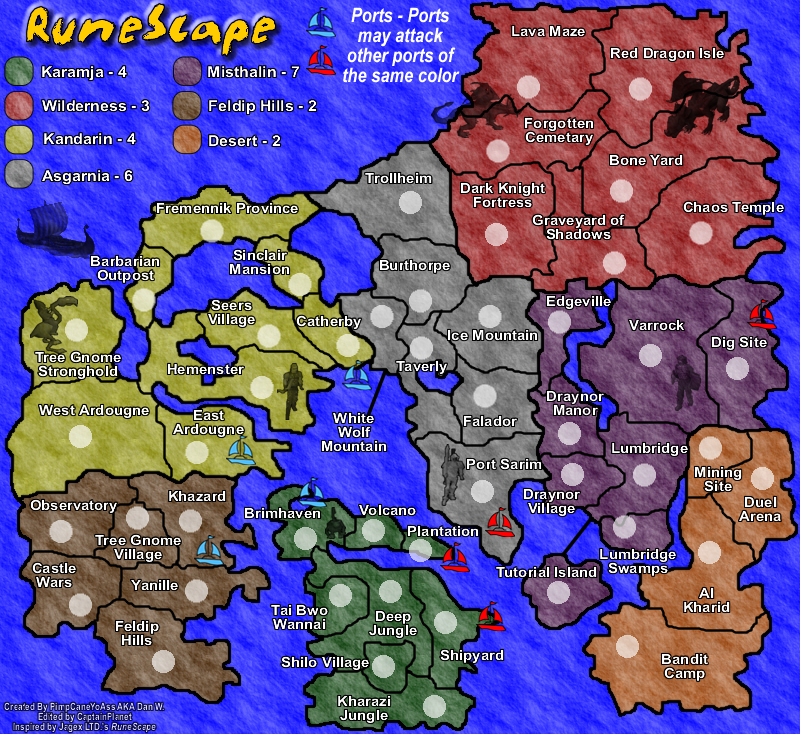
Changes
-Remove some pictures
-Converted pictures that I left there to alpha
-Removed impassible borders
Comments
-I cut the number of pictures down and added the viking boat back. Comment on the new look.
-The impassible borders is still a major topic to address. I dont know how to add trees, mounntains, rock, walls, or lava easily. Do I have to hand draw the trees and everything or is there an easier way to do this. Please offer feedback and help with this issue.
Changes
-Remove some pictures
-Converted pictures that I left there to alpha
-Removed impassible borders
Comments
-I cut the number of pictures down and added the viking boat back. Comment on the new look.
-The impassible borders is still a major topic to address. I dont know how to add trees, mounntains, rock, walls, or lava easily. Do I have to hand draw the trees and everything or is there an easier way to do this. Please offer feedback and help with this issue.
-
PimpCaneYoAss
- Posts: 185
- Joined: Fri Feb 16, 2007 3:04 pm
- Location: Connecticut
I don't feel the pictures or the bevelled look fit very well with the map. Your Forgotten Cemetary/Graveyard of Shadows border doesn't go all the way to the Dark Knight Fortress border. Hmm... you've got some long names, consider shortening them if you can as it may cause problems the drop-down menu.
-
PimpCaneYoAss
- Posts: 185
- Joined: Fri Feb 16, 2007 3:04 pm
- Location: Connecticut
How many characters fit in the drop down menu for one territory?
NEW UPDATE 4/18/07
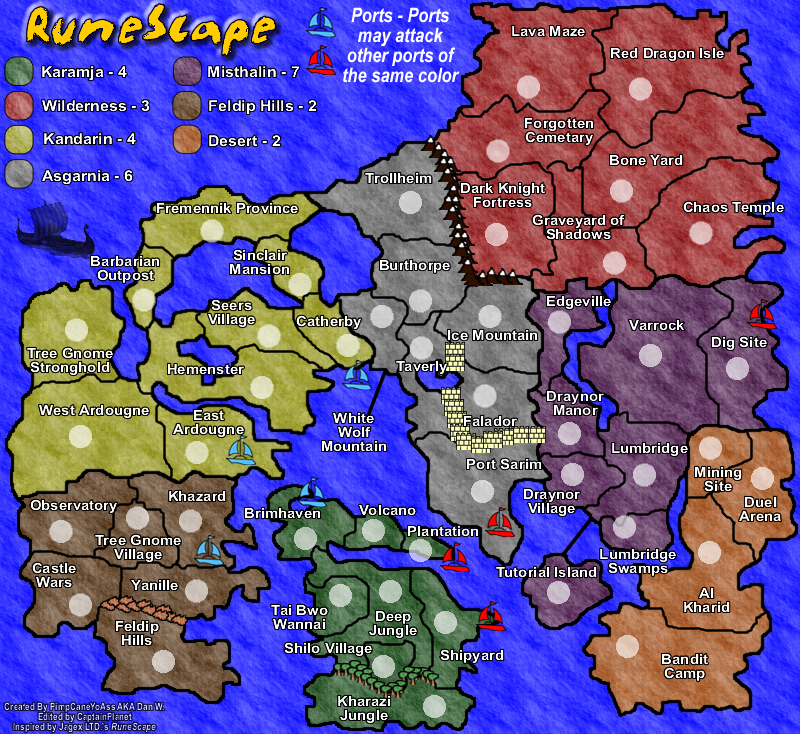
Changes
-Added Impassible barriers
-Removed almost all of the pictures
-Removed bevel
Comments
-The impassiible barriers are a starting point for gameplay options. I will work on them graphically.
-For the pictures i am going to try removing them all and just sticking to ones that can be placed in the oceans (Compass, boats, etc) I think they crowd the land a bit too much.
Problems to be addressed
-Graveyard of Shadows Border
-I will work on the Impassible borders.
-Adding more pictures to the seas and not the land
-Blur borders and compass
NEW UPDATE 4/18/07
Changes
-Added Impassible barriers
-Removed almost all of the pictures
-Removed bevel
Comments
-The impassiible barriers are a starting point for gameplay options. I will work on them graphically.
-For the pictures i am going to try removing them all and just sticking to ones that can be placed in the oceans (Compass, boats, etc) I think they crowd the land a bit too much.
Problems to be addressed
-Graveyard of Shadows Border
-I will work on the Impassible borders.
-Adding more pictures to the seas and not the land
-Blur borders and compass
Last edited by PimpCaneYoAss on Thu Apr 19, 2007 10:24 pm, edited 1 time in total.
-
PimpCaneYoAss
- Posts: 185
- Joined: Fri Feb 16, 2007 3:04 pm
- Location: Connecticut
NEW UPDATE 4/20/07 (WEEED lol)
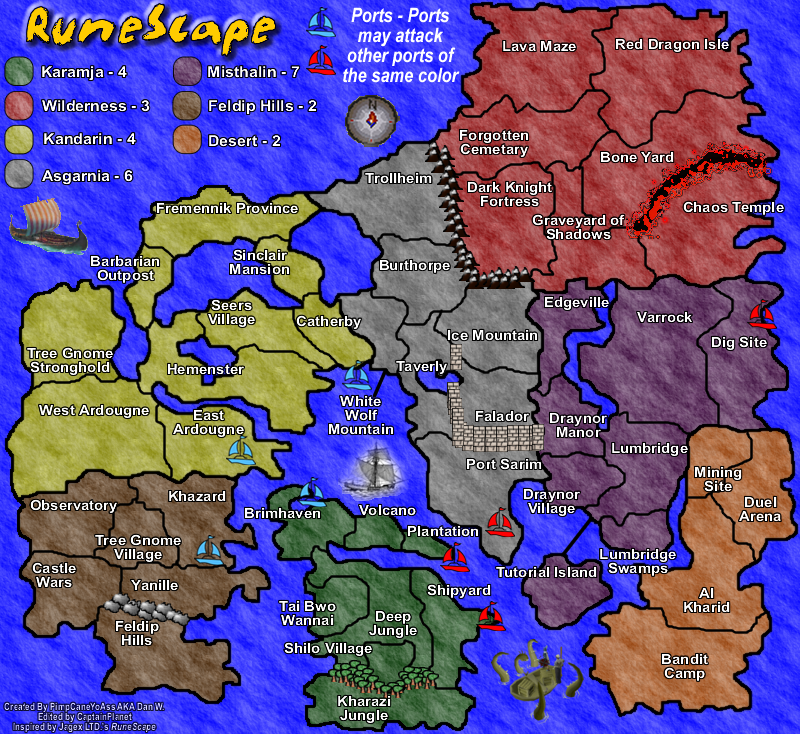
Changes
-Added impassible lava to Wilderness
-Added more trees to Karamja
-Change the rock in Feldip Hills (Bevel and Gray)
-Changed the mountains between Asgarnia and Wilderness (Bevel and more)
-Changed the wall around Falador
-Fixed the border of Graveyard of Shadows
-Added a RuneScape compass
-Added a RuneScape seamonster by desert
-Added a bost between Karamja and Asgarnia
Comments
-The images still need some help
-I like the impassible borders now
-Compass looks "nub" but thats RuneScape
-Still need to add Army Circles
Problems to be addressed
-Add army circles
-Make Falador's wall look like a single wall
-Blur the compass
-Look into bonuses
-Rocks in Feldip Hills
-Country Names
-Pictures and copyright issues
Changes
-Added impassible lava to Wilderness
-Added more trees to Karamja
-Change the rock in Feldip Hills (Bevel and Gray)
-Changed the mountains between Asgarnia and Wilderness (Bevel and more)
-Changed the wall around Falador
-Fixed the border of Graveyard of Shadows
-Added a RuneScape compass
-Added a RuneScape seamonster by desert
-Added a bost between Karamja and Asgarnia
Comments
-The images still need some help
-I like the impassible borders now
-Compass looks "nub" but thats RuneScape
-Still need to add Army Circles
Problems to be addressed
-Add army circles
-Make Falador's wall look like a single wall
-Blur the compass
-Look into bonuses
-Rocks in Feldip Hills
-Country Names
-Pictures and copyright issues
Last edited by PimpCaneYoAss on Wed Apr 25, 2007 1:43 pm, edited 3 times in total.
-
wiggybowler
- Posts: 1414
- Joined: Wed Feb 21, 2007 9:40 pm