Kirthanin
Moderator: Cartographers
Forum rules
Please read the Community Guidelines before posting.
- fisherman5
- Posts: 48
- Joined: Fri Jan 12, 2007 9:33 pm
Kirthanin
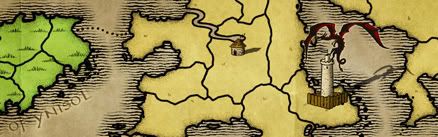
so far this is what i've got any suggestions to improve it would be great i am aware that some of the countries have less or more borders/territories then listed but it is generally pretty close


- Anarkistsdream
- Posts: 7567
- Joined: Wed Jan 10, 2007 11:57 am
- Gender: Male
- fisherman5
- Posts: 48
- Joined: Fri Jan 12, 2007 9:33 pm
- fisherman5
- Posts: 48
- Joined: Fri Jan 12, 2007 9:33 pm
- fisherman5
- Posts: 48
- Joined: Fri Jan 12, 2007 9:33 pm
- Sargentgeneral
- Posts: 379
- Joined: Thu Nov 16, 2006 11:55 pm
- Location: On Conquerclub, duh!
- everywhere116
- Posts: 1718
- Joined: Sat Sep 16, 2006 9:37 am
- Location: Somewhere on this big blue marble.
- fisherman5
- Posts: 48
- Joined: Fri Jan 12, 2007 9:33 pm
- fisherman5
- Posts: 48
- Joined: Fri Jan 12, 2007 9:33 pm
- fisherman5
- Posts: 48
- Joined: Fri Jan 12, 2007 9:33 pm
- fisherman5
- Posts: 48
- Joined: Fri Jan 12, 2007 9:33 pm
- Bad Speler
- Posts: 1027
- Joined: Fri Jun 02, 2006 8:16 pm
- Gender: Male
- Location: Ottawa
- Contact:
Its a bit complicated for textures. This is how i do it:fisherman5 wrote:wisse i haven't quite figured textures out yet on inkscape but i am thinking about how to improve the bridges currently

First find a sort of tiling texture, GRsiteshas good ones. Then import it into inkscape. I turn it into a pattern (Alt + I). I then copy the continent i want to apply the texture to and fill that continent with a texture. Then, i put a partially transparent coloured continent over the texture and voila. Thats how i do it. There might be a simpler way, but I havent found it.
Highest Score: 2532
Highest Position: 69 (a long time ago)