Help
Play States
Play By Clickable Map
Deploy: Click on territory to deploy, choose number to deploy and click again to make deployment
Assault: Click on a territory to Assault from, then on a territory to Assault (right click to Auto Assault)
Advance: Click on conquered territory to choose to advance, choose number to advance, then click again to advance. Click on conquering territory to advance zero.
Reinforce: Click on a territory to Reinforce from, then on a territory to Reinforce to. Click again to confirm.
Play By Keyboard and Mouse
N Key: Skip to next game, Jump to next game
B Key: Begin Turn
E Key: End Deployment, End Assaults, End Reinforcement
L Key: Later (decline to play spoils)
W,S Keys: Increase/decrease troop quantity (slow)
Q,A Keys: Increase/decrease troop quantity (fast)
Mouse Wheel: Change troop quantity by scrolling over the selected region.
CTRL Key + Click: You can always use CTRL-click instead of the right mouse button.
Middle Click: To advance to next stage (Begin Turn, End Assaults, etc.) click the middle mouse button anywhere on the map.
2025-12-19 22:35:52 - Game has been initialized
2026-01-30 11:41:50 - Zorro134 eliminated Crash_22 from the game
2026-02-01 18:34:31 - Zorro134 eliminated misteryforall from the game
2026-02-03 13:30:16 - Zorro134 eliminated theelkspeaks from the game
2026-02-05 10:57:02 - Zorro134 eliminated Bada0Bing from the game
2026-02-05 10:57:02 - rousseau72, t4mcr53s2, Zorro134, hjelp won the game
2026-02-05 10:57:02 - Crash_22 lost 16 points
2026-02-05 10:57:02 - Bada0Bing lost 16 points
2026-02-05 10:57:02 - misteryforall lost 16 points
2026-02-05 10:57:02 - theelkspeaks lost 16 points
2026-02-05 10:57:02 - rousseau72 gained 16 points
2026-02-05 10:57:02 - t4mcr53s2 gained 16 points
2026-02-05 10:57:02 - Zorro134 gained 16 points
2026-02-05 10:57:02 - hjelp gained 16 points
2025-12-20 20:12:03 - hjelp: Hi gl:)
2025-12-28 13:14:30 - hjelp: rousseau for hjelp down to 20 min
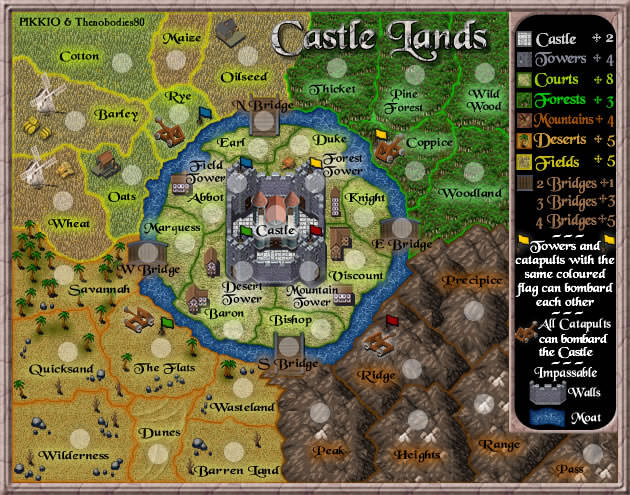
2025-12-28 15:09:25 - t4mcr53s2: thats seemed clever but its trench so it would take 4 to reach bishop better if orange takes barren land and peaks with your 5 to fort , then if he took south bridge he'd be next to bishop
2026-01-10 10:35:48 - GoranZ: GO FALL!
2026-01-16 07:18:49 - hjelp: rous for hjelp - 80 min left
2026-01-18 16:41:31 - GoranZ: GO FALL!
2026-01-18 18:28:59 - misteryforall: Ma f*ck....isn't real....
2026-01-19 08:12:02 - rousseau72: the dice were as unreal as the dice that got you into that winnninig posiiton ;)
2026-01-19 08:12:53 - rousseau72: i think we put it on earl - drop 1 at a time
2026-01-21 04:51:59 - misteryforall: Use all skills now.....
2026-01-21 11:57:46 - Zorro134: The important thing about a dice game is to be the best at rolling the dice!
2026-01-23 09:10:37 - GoranZ: GO FALL!
2026-01-25 09:46:17 - hjelp: rousseau for hjelp down to 45 min
2026-01-28 14:31:34 - theelkspeaks: tt for Elk
2026-02-01 18:35:42 - Zorro134: Gg
2026-02-02 13:40:22 - rousseau72: gga
2026-02-03 04:03:34 - Bada0Bing: gg
2026-02-05 04:03:50 - t4mcr53s2: gga wp