Page 8 of 28
Posted: Tue Dec 04, 2007 11:13 pm
by Coleman
I'm locking this, please post in your topic, if you want a new poll send a request to me or Andy and we'll remove your current one and post the results in your topic.
Posted: Tue Dec 04, 2007 11:23 pm
by Coleman
If you go back and edit your first post you can add a poll.
I don't mind the cannons. I don't think they need to be there either. I have no opinion.
Posted: Wed Dec 05, 2007 2:20 am
by oaktown
I have two issues with the cannons:
1. I don't get why are there to begin with... you want suggestions for bonus points so I assume they are territories somehow? What are they going to link to?
2. They are very dark - much heavier than everything on the map, which detracts from the overall look.
Posted: Sun Dec 09, 2007 10:04 am
by rgbubba
oaktown wrote:I have two issues with the cannons:
1. I don't get why are there to begin with... you want suggestions for bonus points so I assume they are territories somehow? What are they going to link to?
2. They are very dark - much heavier than everything on the map, which detracts from the overall look.
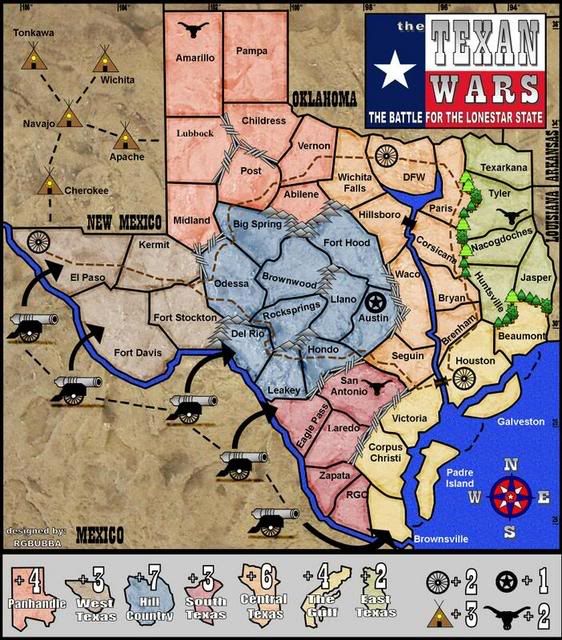
Do these canons look better? Yes the canons act as it's own. I could not find an item that would best describe the Mexican Army. I had idea maybe I could just make land grab areas but I went with canons instead. The time period reflects when mexico tryed taking Texas in days of the Alamo.
Map 17
Posted: Sun Dec 09, 2007 1:59 pm
by WidowMakers
How do you attack the cannons? Currently if someone starts with the cannon no one can kill them unless they have a cannon too.
WM
Posted: Mon Dec 10, 2007 8:29 pm
by rgbubba
WidowMakers wrote:How do you attack the cannons? Currently if someone starts with the cannon no one can kill them unless they have a cannon too.
WM
Your Right! I will make those ajustment to the game play.
Posted: Mon Dec 10, 2007 11:40 pm
by rgbubba
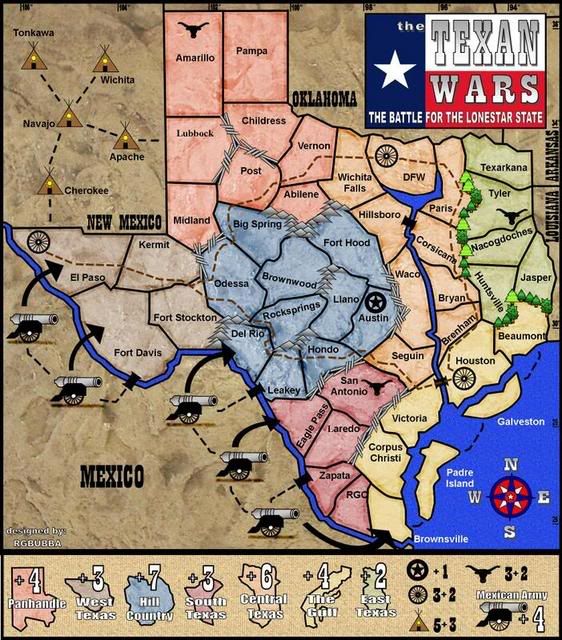
Map 18 - With canons and road attacks to them.
Posted: Mon Dec 10, 2007 11:54 pm
by Incandenza
It's a nice-looking map thus far.
A few comments:
The RGO territory name looks really cramped.
Lubbock looks like it's in a different font than the other terit names.
I don't get what the brown dashed line is for. If it's an attack route (i.e. you can attack DFW from Houston), you'll need to have that info somewhere in the legend. If not, you can probably lose it.
Speaking of the legend, it seems like there must be a better way to denote the grouped bonuses (longhorn, wagon wheel, and teepee), like "All [wagon wheel] +2."
Do the cannon attack along the big black arrows, or just bombard?
The coloring of central texas and the gulf are awful similar. You've mitigated that somewhat by having the continent outlines in the legend, but it wouldn't hurt to differentiate them a bit more.
The continents in general are going to be tough to hold...
Also, I seem to recall that in the time period you're going for (secession from Mexico), the now-state of Oklahoma was not yet a state and was called the Indian Territory or some such. Also, the Cherokee didn't ever kick it in New Mexico (also not a state at the time).
Posted: Tue Dec 11, 2007 7:40 pm
by rgbubba
Incandenza wrote:It's a nice-looking map thus far.
A few comments:
The RGO territory name looks really cramped.
It's the program I'm using. It's moving the names slitly to the right. I will ajust. RGC - Rio Grand City.
Posted: Tue Dec 11, 2007 7:46 pm
by rgbubba
Incandenza wrote:It's a nice-looking map thus far.
Do the cannon attack along the big black arrows, or just bombard?
Just Bombard. I thank that's what I'm gooding for. Do you have an Idea?
Posted: Tue Dec 11, 2007 8:06 pm
by rgbubba
Incandenza wrote:I don't get what the brown dashed line is for. If it's an attack route (i.e. you can attack DFW from Houston), you'll need to have that info somewhere in the legend. If not, you can probably lose it.
I have decide to take the brown lines off. The wagon wheels are there to get extra points when all are collected.
Posted: Wed Dec 12, 2007 8:31 pm
by rgbubba
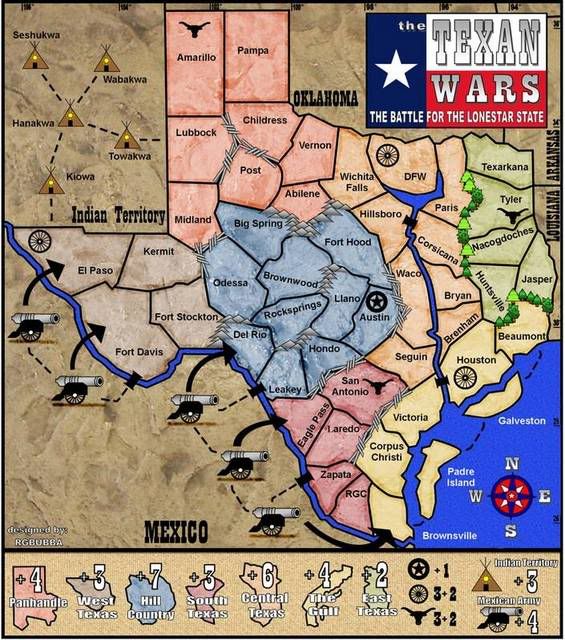
The names of the Indian Territiries has changed, and there will be three ways in to Mexico to the canons.
MAP 20
Posted: Wed Dec 12, 2007 8:38 pm
by bspride
hey man odessa is really north of midland...also big spring and the territory named odessa are actually on the edwards plateau, not in hill country...and post is definetly not the biggest town in that area
Posted: Thu Dec 13, 2007 12:14 am
by rgbubba
bspride wrote:hey man odessa is really north of midland...also big spring and the territory named odessa are actually on the edwards plateau, not in hill country...and post is definetly not the biggest town in that area
Thanks for the update on towns names. I'll take a look in to it.
If you would look at the map Odessa is southwest of Midland.
I will change Midland to Plains, it might fit better.
Posted: Thu Dec 13, 2007 7:31 pm
by bspride
sry...my bad...keep it midland...its definetly bigger than Plains.

Posted: Sun Dec 16, 2007 12:11 pm
by rgbubba
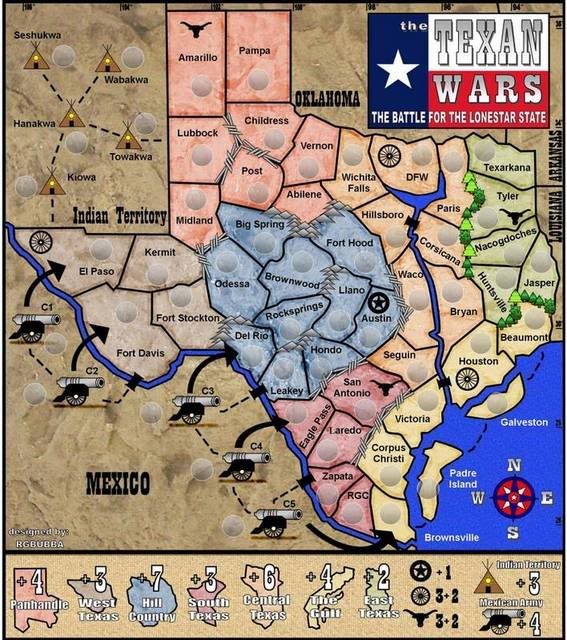
Made Bryan bigger.
Map 21
Posted: Sun Dec 16, 2007 12:14 pm
by Coleman
Need a small and large of the latest version.
Posted: Mon Dec 17, 2007 11:03 am
by Coleman
Coleman wrote:Need a small and large of the latest version.
Okay, I apologize for my blindness. I'll be recommending you for movement now.
Posted: Tue Dec 18, 2007 12:57 am
by rgbubba
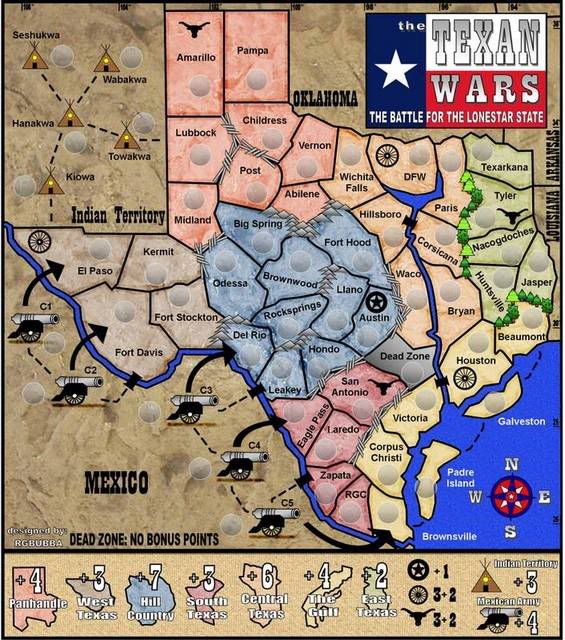
Witch on do you like? Map 21 or Map 22
Map 21
Map 22
Posted: Tue Dec 18, 2007 12:29 pm
by Coleman
I can't tell the difference.

Posted: Wed Dec 19, 2007 1:38 pm
by Coleman
Okay, Andy and I have been debating a bit internally and the main issue keeping your map out of Final Forge is the pixelation/graininess of some things.
I think this may be due to the jpg compression you used. Try to save your working file as a png and then upload it.
If that isn't the case then you are just going to need to fix it manually and keep posting it as a png file from now on.
The problem happens around the black text, Fort Stockton is probably the worst one, if you notice right below it all the excessive graininess.
The icons (cannons and tepees) don't quite look good either due to the jpg compression (at least i hope it is jpg compression, I'd hate to make you redraw everything, but that may be what you are looking at as having to do).
Posted: Wed Dec 19, 2007 8:47 pm
by rgbubba
Coleman wrote:Okay, Andy and I have been debating a bit internally and the main issue keeping your map out of Final Forge is the pixelation/graininess of some things.
I think this may be due to the jpg compression you used. Try to save your working file as a png and then upload it.
If that isn't the case then you are just going to need to fix it manually and keep posting it as a png file from now on.
The problem happens around the black text, Fort Stockton is probably the worst one, if you notice right below it all the excessive graininess.
The icons (cannons and tepees) don't quite look good either due to the jpg compression (at least i hope it is jpg compression, I'd hate to make you redraw everything, but that may be what you are looking at as having to do).
Thanks for helping me out! I will look in to it after the Holidays!
Posted: Wed Dec 19, 2007 8:50 pm
by AndyDufresne
Agreed with Coleman's post. If it's just compression troubles, then no real problem there. But if it's a little more try to spruce up the grainy areas. It's coming along Rgbubba! I remember when you started this map so long ago...
--Andy
Posted: Wed Dec 19, 2007 8:51 pm
by rgbubba
Coleman wrote:I can't tell the difference.
I have a dead zone added for no bonus points. But you have to take to cross other territories. Look in Central Texas by Houston.
Posted: Wed Dec 19, 2007 8:55 pm
by Incandenza
The dead zone seems kinda extraneous.... none of the surrounding continents are easier or harder to hold with it there...
It looks way better, rg. Thanks for taking the time to address my concerns.
