TaCktiX wrote:I intentionally didn't fontshop. The image was to show the "under the state" and "Tribal colors" ideas visually.
Default font will only get you so far. Sometimes you need to fontshop. Besides your example did fail to do either of the points you intended to, I feel.
CURRENT UPDATE INFO-2011-08-21:
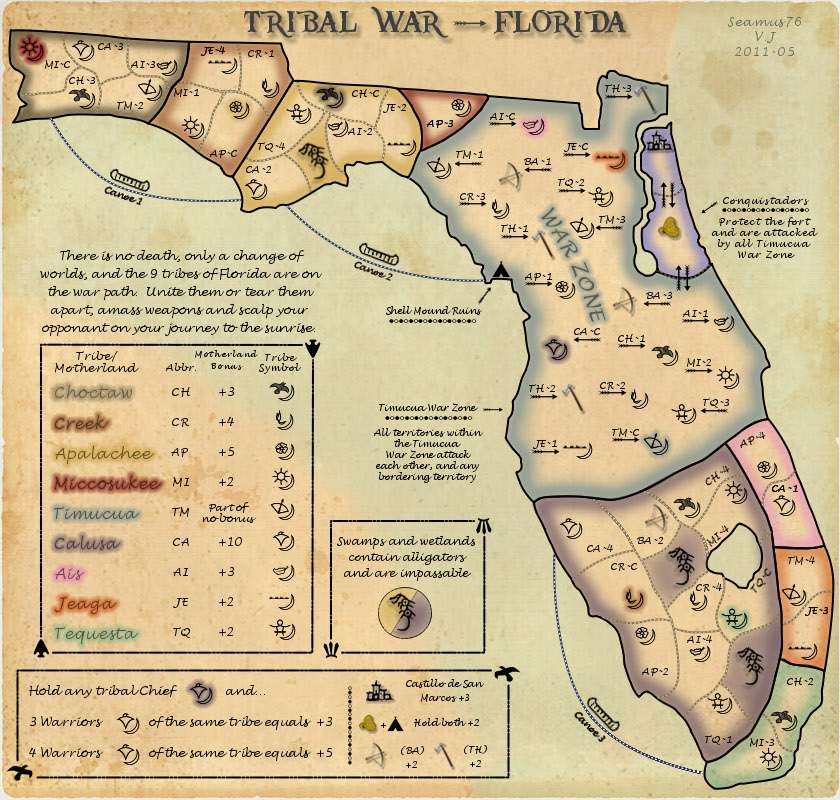
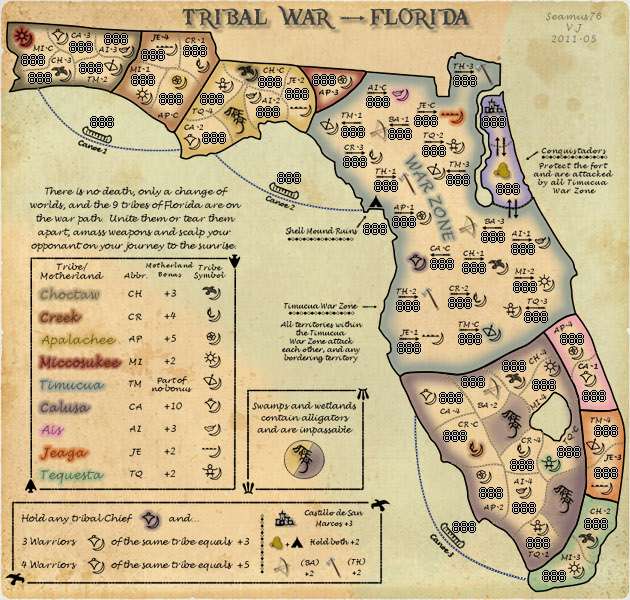
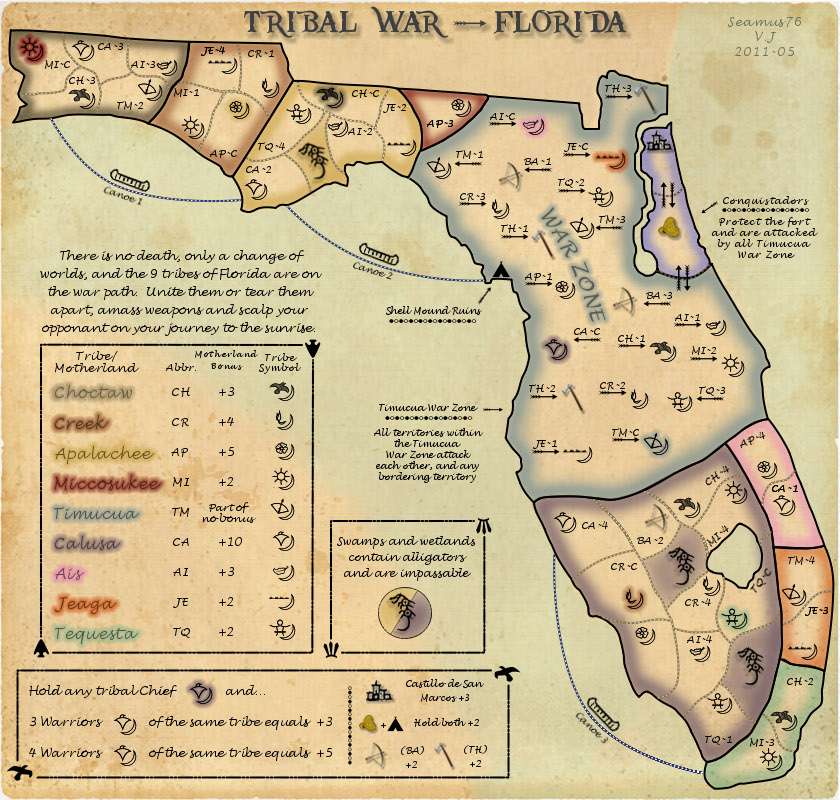
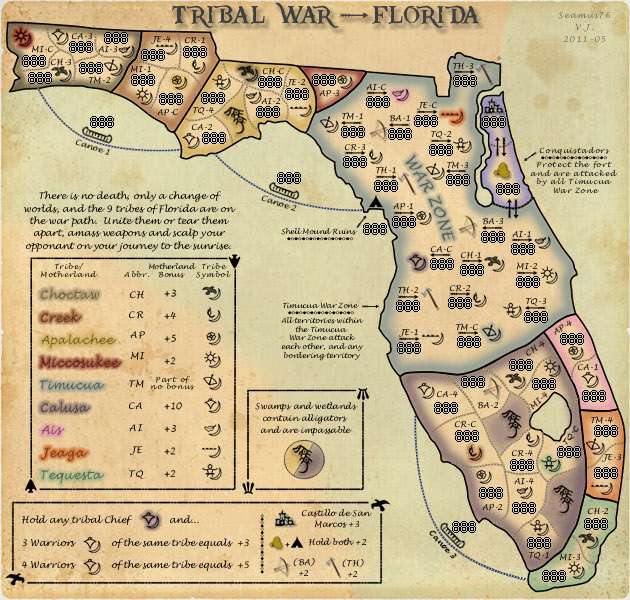
- Sorry for the slow updates. Once I started putting in the 888's on the small map I realized I needed to adjust some of the territory borders so everything would fit. It's tight, but it all fits. I wanted the two versions to be the same so I made all of the changes to the large map before creating the small, which took me longer than I wanted. I know everything will fit the large map so I didn't add the 888's but if that is needed let me know and I'll start working on it.
- I should have the title for the next update.
- Thanks for feedback, let me know what's left before a sticky.
A couple of minor points you can add to the list and these are subjective...
1. The brown(land)/sea(green) at the top left is very sharp (next to Florida) compared to the rest (by your legend). A bit of merging would be nice.
2.On the small map the icons in the war zone are too close in places - MI2/TQ3. Can you move apart a tad.
3.PINK? What tribe was that?
Looking good. Sorry not been in for a while, looking forward to seeing this title of yours.
I am finding that the text on the small generally is hard to read. Some are either to small (like conquistaders) or blurry (like the continent names in the legends). I think an overall rework of the typography in the small is required. Other than that though this is looking pretty good (pending a new title).
I think the surest way to make sure all the troop numbers fit is to create the XML, or at least a rough first cut with just the territories. The Map XML Wizard is a very good tool for doing this quickly, just point and shoot. Then you can use the Map Inspect portion of the Conquer Club Map Maker tool to create a sample image with 88s, 888s, or whatever you like. (Some suggest 33s, just to see if they are distinguishable from 88s with your map as the background.)
Are you doing the XML yourself, or do you have a coder? If you need help, I could take a shot at this.
Thanks everyone. I was mainly looking to get the maps up to make sure all of the numbers would fit, etc. Right now I am re-doing all of the text on the little map, which currently was just scaled from the large map and obviously isn't idea.
Seamus76 wrote:Thanks everyone. I was mainly looking to get the maps up to make sure all of the numbers would fit, etc. Right now I am re-doing all of the text on the little map, which currently was just scaled from the large map and obviously isn't idea.
Found that out myself. Had to redo all of mine, all 87 territs and legend. A real sod of a job.
ProTip: if you have the territory names as text layers on the large map, they are still text layers after scaling - they just masquerade as regular layers. If you edit them with the text tool, you get a dialog that prompts if you want to discard changes, select yes and the layer bounces back to text layer. Then just adjust the size and position.
ProTip: if you have the territory names as text layers on the large map, they are still text layers after scaling - they just masquerade as regular layers. If you edit them with the text tool, you get a dialog that prompts if you want to discard changes, select yes and the layer bounces back to text layer. Then just adjust the size and position.
CURRENT UPDATE INFO-2011-08-23:
- I redid all of the text on the small map, thanks for the pro tip natty.
- Increased the size of text on small version as well to help with legibility. Personally I think it looks pretty good.
- Still working on the title.
Rotating a text layer directly is not often a good idea, unless the text is really large. When you do that the text is first converted to bitmap and then rotated... which loses accuracy. What I do when I need to rotate small text is, convert the text to path, then rotate the path, and then convert the path to selection and fill selection on a new layer.
This just came to mind, looking at a few of your territory labels...
Minor point though, Miccosukee in the legend in both small and large seems a bit blurry. A couple of others are like it as well. Can you clear that up then text can be crossed of the list.
i would increase the small map to 700*667 because right now some pieces of text are very small and hard to read and if you simply increase the text while keeping the map at 630*600 then the text will be too overpowering.
also, what software are you using? because it seems rotated text becomes blurry (canoes). or perhaps you're converting the text layers into image layers before rotating them? you can still rotate text with no problem. just hit ctrl+T.
“In the beginning God said, the four-dimensional divergence of an antisymmetric, second rank tensor equals zero, and there was light, and it was good. And on the seventh day he rested.”- Michio Kaku
DiM wrote:also, what software are you using? because it seems rotated text becomes blurry (canoes). or perhaps you're converting the text layers into image layers before rotating them? you can still rotate text with no problem. just hit ctrl+T.
natty_dread wrote:Rotating a text layer directly is not often a good idea, unless the text is really large. When you do that the text is first converted to bitmap and then rotated... which loses accuracy. What I do when I need to rotate small text is, convert the text to path, then rotate the path, and then convert the path to selection and fill selection on a new layer.
This just came to mind, looking at a few of your territory labels...
wow and gimp really makes the text that crappy when you rotate it? pff in photoshop you can twist and turn it with no problem and it will be good as new.
why isn't anybody using photoshop anymore?
“In the beginning God said, the four-dimensional divergence of an antisymmetric, second rank tensor equals zero, and there was light, and it was good. And on the seventh day he rested.”- Michio Kaku
DiM wrote:wow and gimp really makes the text that crappy when you rotate it? pff in photoshop you can twist and turn it with no problem and it will be good as new. why isn't anybody using photoshop anymore?
DiM wrote:wow and gimp really makes the text that crappy when you rotate it? pff in photoshop you can twist and turn it with no problem and it will be good as new. why isn't anybody using photoshop anymore?
It's bloody expensive
one word: TORRENTS
“In the beginning God said, the four-dimensional divergence of an antisymmetric, second rank tensor equals zero, and there was light, and it was good. And on the seventh day he rested.”- Michio Kaku
1. Supporting the open-source cause, boycotting patent trolls like Adobe
2. Not wanting to pay huge amounts of cash for a software when you're not using it professionally, ie. not getting money off it
3. Photoshop consumes huge amount of resources, and running the latest version may not even be possible with older hardware. Gimp runs in pretty much anything. Mac, Window, Linux, smartphone... you name it. Heck, you can even run it from a USB drive.
4. Gimp's development is still in progress. It's a much younger software than Photoshop. In certain things it can be considered more advanced than PS, and in others, less. Text handling and vectors in general are something that hasn't been paid too much attention in Gimp development so far, so the text tools are still somewhat primitive. This will hopefully improve in the 2.8 release that is due next December.
However, like I said, there are ways around the limitations, all you need to do is convert the text to a vector path before rotating.
Thanks guys. Yes, PS is too expensive for me, and GIMP is just as good or better than the outdated version of PS Elements I was trying to use at first.
I will give the conversion to vector path a shot. It might be a day or two, but in the mean time let me know if there is anything else I need to work on.
To do:
- Title
- Darken the legend tribe names
- Fix the rotated text and icons

The image was to show the "under the state" and "Tribal colors" ideas visually.