Quad Cities Map [Quenched]
Moderator: Cartographers
Forum rules
Please read the Community Guidelines before posting.
Please read the Community Guidelines before posting.
-
natty dread

- Posts: 12876
- Joined: Fri Feb 08, 2008 8:58 pm
- Location: just plain fucked
Re: Quad Cities Map
Ah. But you have the territories as a separate layer? I mean the coloured part of the territories, not the territory borders?

-
ironsij0287

- Posts: 379
- Joined: Tue Nov 09, 2010 2:30 pm
- Gender: Male
- Location: Dubuque
Re: Quad Cities Map
Borders and colors are together on the same layer.natty_dread wrote:Ah. But you have the territories as a separate layer? I mean the coloured part of the territories, not the territory borders?
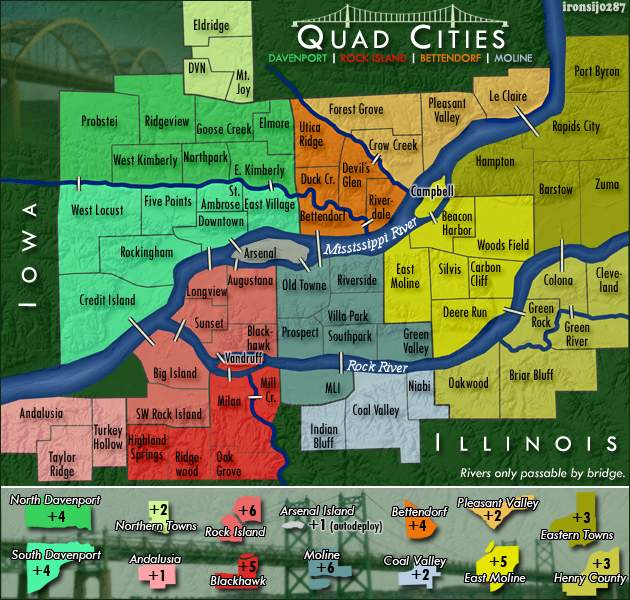
I could beef up the relief a bit more. Like this.
-
ironsij0287
- Posts: 379
- Joined: Tue Nov 09, 2010 2:30 pm
- Gender: Male
- Location: Dubuque
Re: Quad Cities Map
But now that you mentioned it, making the borders and polygons separate layers is a smart idea in the future.
-
natty dread
- Posts: 12876
- Joined: Fri Feb 08, 2008 8:58 pm
- Location: just plain fucked
Re: Quad Cities Map
Ok, it doesn't matter that the borders are on the same layer actually. But yeah, in the future it would be a good rule of thumb to put everything, I mean everything, on it's own layer. That way if you have to make changes to one element it will be much easier for you.
Anyway, go to the layer where you have the territories. Since you use photoshop, you should be able to use layer styles to bevel them. I'm not sure but I think they're somewhere in the layer options... From the layer styles, select inner bevel, and play with the settings until it looks good. Set the angle of light to 135 or 45 so that the light comes from either upper left or upper right...
Anyway, go to the layer where you have the territories. Since you use photoshop, you should be able to use layer styles to bevel them. I'm not sure but I think they're somewhere in the layer options... From the layer styles, select inner bevel, and play with the settings until it looks good. Set the angle of light to 135 or 45 so that the light comes from either upper left or upper right...
Re: Quad Cities Map
If want to add a bevel to the bonus regions, right click on the layer and select Blending options, then select Bevel and Emboss. Then play around with the settings!
-
ironsij0287
- Posts: 379
- Joined: Tue Nov 09, 2010 2:30 pm
- Gender: Male
- Location: Dubuque
Re: Quad Cities Map
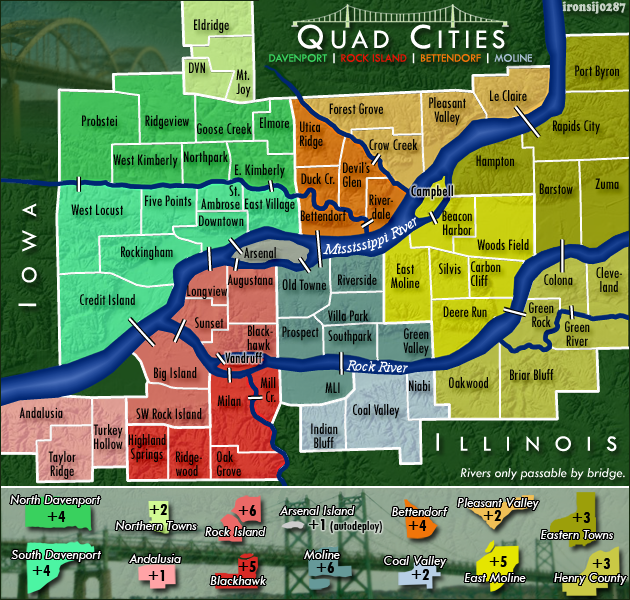
Yeah, I really don't like using the bevel and emboss tool. What about this to make things pop more?
- Click image to enlarge.
-
natty dread
- Posts: 12876
- Joined: Fri Feb 08, 2008 8:58 pm
- Location: just plain fucked
Re: Quad Cities Map
You don't "like" using it?ironsij0287 wrote:Yeah, I really don't like using the bevel and emboss tool.
Those white things don't work, sorry. They stick out too much, but do nothing to pop out the land area from the background.
Try the bevel and let us see how it looks.


-
natty dread
- Posts: 12876
- Joined: Fri Feb 08, 2008 8:58 pm
- Location: just plain fucked
Re: Quad Cities Map
WTH?! They stick out too much, but don't pop enough? That doesn't make sense at all.

-
ironsij0287
- Posts: 379
- Joined: Tue Nov 09, 2010 2:30 pm
- Gender: Male
- Location: Dubuque
Re: Quad Cities Map
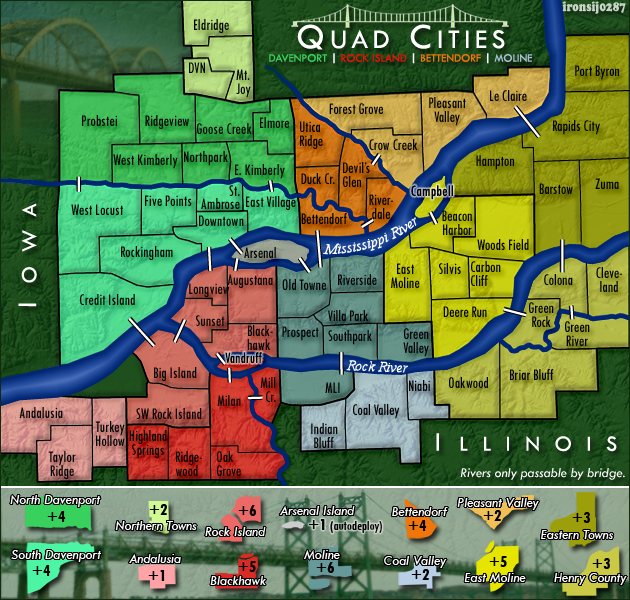
Light beveling with darker boundary lines.
- Click image to enlarge.
Re: Quad Cities Map
Is each territory its own separate layer?
Re: Quad Cities Map
meh. I see the difference, but I could take it either way. I'll admit it does look better than the previous map with black border, but it doesn't matter at all to me.
Lemme save someone else the post: Next up is bevel of the rivers.
Lemme save someone else the post: Next up is bevel of the rivers.
-
natty dread
- Posts: 12876
- Joined: Fri Feb 08, 2008 8:58 pm
- Location: just plain fucked
Re: Quad Cities Map
Are the territories detached from each other? Because it seems each territory has it's own bevel now... It would probably look better to have one bevel per bonus area...
And no, rivers don't need bevels, that's just silly.
And no, rivers don't need bevels, that's just silly.
-
ironsij0287
- Posts: 379
- Joined: Tue Nov 09, 2010 2:30 pm
- Gender: Male
- Location: Dubuque
Re: Quad Cities Map
No I went back and created a separate layer for just borders and then set the bevel to that.isaiah40 wrote:Is each territory its own separate layer?
-
ironsij0287
- Posts: 379
- Joined: Tue Nov 09, 2010 2:30 pm
- Gender: Male
- Location: Dubuque
Re: Quad Cities Map
I can try to do just the bonus regions. I'll need to go back into ArcMap and do some stuff so it'll take me a little bit before I have something ready.natty_dread wrote:Are the territories detached from each other? Because it seems each territory has it's own bevel now... It would probably look better to have one bevel per bonus area...
And no, rivers don't need bevels, that's just silly.
-
natty dread
- Posts: 12876
- Joined: Fri Feb 08, 2008 8:58 pm
- Location: just plain fucked
Re: Quad Cities Map
Here: I took the earlier version, and added a bevel to North Davenport only, to show you how I think the bevel should look.
- Click image to enlarge.

-
ironsij0287
- Posts: 379
- Joined: Tue Nov 09, 2010 2:30 pm
- Gender: Male
- Location: Dubuque
Re: Quad Cities Map
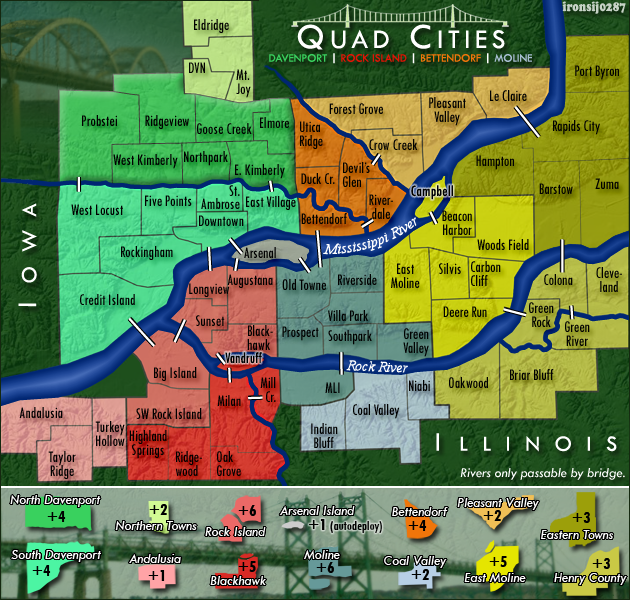
Attempt at duplicating that.
- Click image to enlarge.
-
ironsij0287
- Posts: 379
- Joined: Tue Nov 09, 2010 2:30 pm
- Gender: Male
- Location: Dubuque
Re: Quad Cities Map
Actually I think I got it better than that now. I'm going to do the rest and submit a full draft.
-
ironsij0287
- Posts: 379
- Joined: Tue Nov 09, 2010 2:30 pm
- Gender: Male
- Location: Dubuque
Re: Quad Cities Map
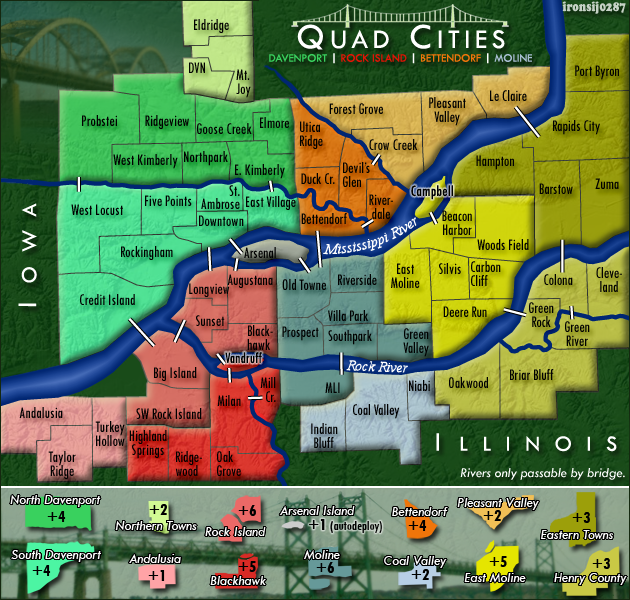
Beveled
- Click image to enlarge.

Re: Quad Cities Map
Looks nice. Arsenal Island is noticeably darker on the map vs the Legend. Could you match it to the shade on the legend.
This post was made by jefjef who should be on your ignore list.

drunkmonkey wrote:I'm filing a C&A report right now. Its nice because they have a drop-down for "jefjef".
-
ironsij0287
- Posts: 379
- Joined: Tue Nov 09, 2010 2:30 pm
- Gender: Male
- Location: Dubuque
Re: Quad Cities Map
It is the same shade. The beveling just made it look darker.jefjef wrote:Looks nice. Arsenal Island is noticeably darker on the map vs the Legend. Could you match it to the shade on the legend.
Re: Quad Cities Map
Well it is no longer the same shade.ironsij0287 wrote:It is the same shade. The beveling just made it look darker.jefjef wrote:Looks nice. Arsenal Island is noticeably darker on the map vs the Legend. Could you match it to the shade on the legend.
This post was made by jefjef who should be on your ignore list.
drunkmonkey wrote:I'm filing a C&A report right now. Its nice because they have a drop-down for "jefjef".
-
natty dread
- Posts: 12876
- Joined: Fri Feb 08, 2008 8:58 pm
- Location: just plain fucked
Re: Quad Cities Map
Tune the bevel down on Arsenal.
Also, in Moline, change the bevel so that it follows the Rock river. It looks odd when it does what it does now.
Also, in Moline, change the bevel so that it follows the Rock river. It looks odd when it does what it does now.
-
ironsij0287
- Posts: 379
- Joined: Tue Nov 09, 2010 2:30 pm
- Gender: Male
- Location: Dubuque
Re: Quad Cities Map
OK. Yeah Moline is all one contiguous piece that is just layered underneath the river right now. That's why the bevel doesn't follow the river properly. I'll fix that.natty_dread wrote:Tune the bevel down on Arsenal.
Also, in Moline, change the bevel so that it follows the Rock river. It looks odd when it does what it does now.